On this page
A black metal scream can stand out against a single tremolo-picked guitar, but it might almost disappear when a second guitar, blast beats and crash cymbals come in. The recording itself may not have changed, but the competition in the mix has. In a dense heavy mix, vocals often get lost because guitars and cymbals cover up parts of their sound that give them presence and clarity. Quieter phrases can fall behind, while reverb and backing layers can hide details that would otherwise be heard.
Turning up the vocal fader might help, but it can also make a distant scream sound harsh and too loud. Before adding more presence EQ or another compressor, figure out what the arrangement is covering up and whether that detail was meant to be heard.
Decide How Close the Vocal Should Feel
Not every heavy vocal needs to sound like it's right in front of the drum kit. A hardcore shout might need each accent to hit with the snare. In technical death metal, clear growls can help listeners follow fast riffs, even if the lyrics are hard to make out. An atmospheric black metal scream might work better as a distant, rough layer inside the guitars.
Post-rock and some atmospheric styles go even further, making the vocal part of the overall texture instead of a separate lead. Turning it up so every word is clear can take away the depth the arrangement was meant to have.
The difference is between vocals that are meant to sound distant and those that get lost by accident. A scream can sit far back but still have a clear start, a noticeable rise in intensity and an ending that leads into the next part. If these features disappear only when the chorus or blast beat comes in, that's a mix issue worth investigating. But if the voice is supposed to blend into the instruments, making every word understandable might not be the right goal.
Find Out What's Covering the Vocal
Start by looping the part where the vocal sounds good and then the part where it doesn't. Leave the vocal processing unchanged at first and listen for the exact moment it loses clarity. A loud meter reading won't tell you which change in the arrangement is hiding the part of the performance you want to hear.
Use Temporary Level Moves to Find the Conflict
Lower the rhythm guitar bus for a moment while the whole mix plays. If the words or the shape of the growl become easier to hear, the guitars are part of the issue. Put them back at their original level before checking the overheads, room mics or drum processing that brings out the cymbals. Depending on the scream's tone and how the cymbals were recorded, a crash can hide the start of the scream even if the guitars aren't the main problem.
If the vocal drops away on only a few words, inspect those words in the raw take. Their level, microphone distance or delivery may be different. And if bypassing the vocal effects restores the phrase endings, the problem may be on the reverb or delay return rather than in the dry recording.
| What You Hear | What to Test | What the Result Suggests |
|---|---|---|
| The vocal fades when a second guitar layer enters | Briefly lower that layer or the guitar bus | Guitar level or frequency masking |
| Consonants disappear under crashes and cymbal wash | Briefly reduce overheads or cymbal-heavy processing | Competition from cymbals or drum ambience |
| Only certain words disappear | Compare raw clip gain and the compressor's response | Uneven performance level or dynamics |
| The next line is blurred by the previous one | Bypass the vocal effects return | Reverb or delay tails overlapping the next phrase |
These tests help you find the problem, but they don't mean you should leave the drums or guitars quieter. The chorus still needs to sound big. Once you know what's covering the vocal, bring that part back and make the smallest change that works when you compare before and after.
Listening tip: Change one competing source at a time while the full mix plays. If you lower the guitars, overheads and reverb together, you might hear an improvement without learning which change helped.
Make Room in the Guitars Before Brightening the Vocal
Distorted guitars sound dense because distortion adds harmonics and often increases sustain. Add double-tracked guitars, sustained cymbals and a screamed vocal, and several sounds may compete in the same midrange.
Boosting the vocal's presence might make it clearer on its own without solving that competition. It can also bring out the harshest parts of a scream, leaving the chorus more tiring to hear while the quieter syllables remain buried.
Find the Overlap Before Cutting EQ
Briefly lower the guitar bus during the line that's getting buried. If the vocal comes through, but the guitars lose too much weight, restore their level and listen for the part of the guitar tone that's covering the voice. A small EQ cut in that area may help.
There's no single frequency that works for every growl, fry scream or high shriek. The vocal's register, guitar cabinet or impulse response, drum processing and arrangement all affect where masking occurs. You can sweep to locate a possible overlap, but make the final EQ decision with the full mix playing.
Choose a Move That Fits the Problem
Different conflicts call for different tools. Pick the simplest one that solves what you're hearing, rather than building a complex sidechain setup by default.
| When the Conflict Happens | What to Try | What to Watch For |
|---|---|---|
| The guitars cover the vocal throughout the passage | A small, static EQ cut on the guitar bus | Losing guitar weight when the vocal stops |
| The vocal gets buried only in a chorus or specific line | Automate the guitar level or EQ cut | An obvious dip or tonal change at the edit |
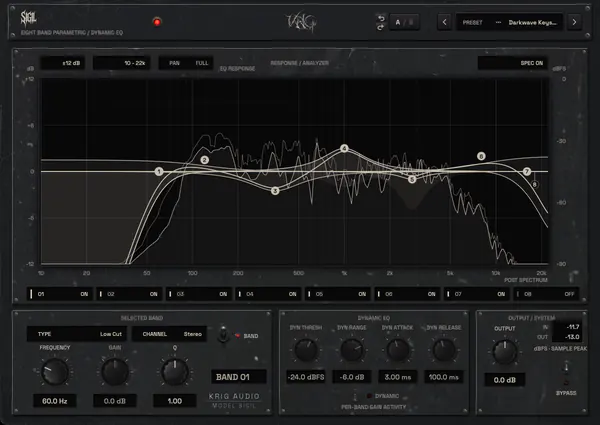
| A particular guitar frequency masks the vocal only while it sings | Vocal-triggered dynamic EQ, if the EQ supports an external sidechain and the DAW can route the vocal to it | The guitar tone changing noticeably on each phrase |
| A guitar resonance becomes too strong when the guitar itself gets louder | Dynamic EQ reacting to the guitar's own input | Mistaking resonance control for vocal-triggered ducking |
| The whole guitar bus overpowers the vocal intermittently | A small automated level ride or broadband sidechain compression | Pumping around sharp vocal hits or short gaps |
| The masking region shifts as the vocal changes register or articulation | Sidechain-controlled spectral unmasking, if the processor and routing support it | Unnatural tonal movement, excessive cuts or overreaction to sibilants |
Listening tip: A dynamic EQ that's listening only to the guitar can't know when the vocal enters. If you need the guitar to move *because of the vocal*, check the plugin's external sidechain support before setting it up.
Broadband compression may be faster to set up than several moving EQ bands, but it reduces the entire guitar signal rather than a selected frequency range. Compare it against a small manual level ride and keep whichever retains the riff's impact. You don't need moving processing if one quiet fader adjustment does the job.
When Spectral Ducking Makes Sense
A spectral unmasking processor can use a vocal sidechain to apply many changing frequency reductions to the guitars, following overlaps that a handful of dynamic EQ bands might miss. Different processors use different analysis and filtering methods, so don't assume they all detect or cut the same frequencies in the same way.
Start with gentle processing and compare at matched loudness. If the guitars change tone with every consonant or lose their character whenever the vocal enters, reduce the amount of ducking or return to a simpler move.
Can Mid/Side EQ Help Without Thinning the Guitars?
With a stereo rhythm-guitar bus, a small EQ cut on its Mid component may make room for a center-panned vocal while leaving more of the Side energy alone. But Mid isn't a channel containing only center-panned instruments: hard-panned guitars contribute to both Mid and Side. M/S EQ can change stereo width and the balance that survives mono summing, so compare it with a regular EQ cut in stereo and mono.
If you still have the individual guitar tracks, adjusting those directly may be more predictable than processing the whole stereo bus.
Control the Vocal's Level Without Flattening Its Performance
Harsh vocals don't have even dynamics. A low growl might hold a long, steady vowel, while a shout starts loud and then gets quieter and breathier. Even two lines delivered with similar energy can hit the compressor at very different levels.
Use Clip Gain Before Adding More Compression
Listen to the vocal with the instruments and mark the phrases that are unusually quiet or loud. Clip gain changes the signal before it reaches the compressor, so bringing up one weak line can help keep it from dropping below the mix. Lowering a sudden shout can prevent it from driving the compressor too hard.
This doesn't mean you should make every word the same volume. Raw black metal and hardcore often rely on uneven delivery, and a rough shout can make a line feel urgent. Only fix the changes that stop the performance from working as it should.
Let Compression and Fader Automation Do Different Jobs
Once the largest level differences are under control, compression can handle the remaining changes. Set the attack by listening to how the start of the words comes through, and set the release by hearing how the level recovers between phrases. An attack that's too fast for the performance can dull consonants; an unsuitable release can pull breaths and noise forward or make the movement between words sound unnatural.
After that, use the vocal fader to follow changes in the arrangement. A line that sits well in a simple verse might need a little more help when quad-tracked guitars and blast beats fill the chorus.
Mixing tip: Clip gain evens out unusually quiet or loud phrases *before* compression. Compression controls the remaining movement. Fader automation places the vocal against the band as the song changes. They do different jobs, and none has to do all three.
This takes more work than loading a vocal chain and adjusting the threshold, but you get to decide which lines stand out and which ones blend into the music.
If One Compressor Is Doing Too Much
If a sharp shout drives the compressor hard enough to flatten the growl that follows, two lighter stages may give you better control. A fast peak-catching stage can restrain abrupt peaks, leaving a slower leveling compressor to manage broader phrase movement. The order isn't universal, and a limiter isn't required. Listen for softened consonants, release pumping and excessive combined gain reduction before keeping a second processor.
Parallel compression is another option. Blend a compressed vocal copy beneath the less-processed lead to add density while retaining some of its original attack. Check whether the parallel path brings up breaths, room noise or sibilance, and make sure any processing latency is compensated so the two paths combine as intended.
Mixing tip: Serial compression splits the work between stages; parallel compression blends different versions of the same performance. Neither is a requirement if clip gain, one compressor and automation already work.
Use Saturation Only When It Improves Definition
A low growl can sound heavy on full-range speakers but lose some character on smaller ones. Gentle saturation or parallel distortion can add upper harmonics, making parts of that low vocal texture easier to hear on small speakers. This may help with definition, but it won't always make consonants clearer, especially if the guitars already occupy the same upper range.
Keep a less-processed version of the vocal available and compare at the same loudness. Added distortion often makes a vocal seem more intense before it becomes clearer, and too much can blur consonants, exaggerate sibilance or make the growl fight even harder with the guitars. Parallel processing lets you mix in the texture you want without changing the entire vocal.
If the original recording has severe clipping, room noise or large changes in microphone distance, saturation and compression can bring those problems forward. Fix as much as you can during recording or editing. No processor can restore articulation that wasn't captured.
Keep Reverb and Backing Layers from Swallowing the Lead
Long reverb can push a black metal scream behind the band or spread a clean post-rock vocal across a wide mix. But if the tail is still loud when the next line starts, it competes with the new phrase. The mix might sound big while the performance becomes harder to follow.
Work on the Effects Return, Not Only the Dry Vocal
Solo the reverb or delay return briefly to hear what it's adding, then make decisions with the full mix playing. Depending on what's obscuring the vocal, try one of these moves:
* Too much low-mid buildup? Filter unwanted low-mids from the wet return so it competes less with the dry vocal. Why your mix sounds muddy covers that buildup in more depth. * The tail runs into the next phrase? Shorten the decay, lower the return or automate the send during the busy section. * You want distance without covering the words? Duck the wet return from the dry vocal while the singer is active, then let it recover between lines. Listen for an unnatural swell instead of relying on a fixed gain-reduction target. * Only the end of a line needs space? Try a delay throw on that word instead of sending every syllable into the effect.
A sustained wash may be exactly what an atmospheric black metal song needs. These changes are options for a problem you can hear, not rules that every distant vocal must follow.
Give Each Backing Vocal a Clear Purpose
Double-tracked screams and gang shouts can make a chorus sound bigger, but using every layer on every syllable may hide the lead vocal's clarity and rhythm. Let the main vocal carry most of the line, and bring in the backing voices on the last word or for a particular accent. In hardcore, that response can hit harder than a constant wall of shouts.
A loose double track can work well for punk or raw black metal, and a lower growl can give a phrase more weight. Keep the rough edges if they fit the song, but choose which vocal layer should stand out instead of letting several compete at once.
Test the Loudest Part, Then Listen to the Verse Again
Once the vocal comes through the way you want, return any temporarily lowered buses to their intended balance and listen to the whole transition. Compare processing changes at similar perceived loudness, since a louder version can seem better even when the tone is worse.
Before calling the mix finished, listen in three different ways:
* At a quieter monitor level: Check whether the vocal's rhythm and main accents still come through without relying on loud playback. * In the exposed sections: A guitar cut that clears the chorus might leave a solo riff thin, while a vocal presence boost could sound harsh when only one instrument is playing. * In mono: Wide guitars and stereo vocal effects can change the balance when the channels are combined, so check that the vocal still sits where you intended.
If you can hear when the vocal comes in, follow its rhythm and feel its emotion at the right distance in the mix, it's doing its job. In a busy death metal song, that might mean a growl with understandable words. In atmospheric black metal, it could be a distant scream that never disappears when it shouldn't.
Image credits
- Condenser Microphone with Pop Filter and Reflection Filter: Tim Sheerman-Chase, CC BY 2.0, Wikimedia Commons. Cropped and resized by KRIG Audio.
Questions on this topic
Guitars or cymbals may be masking the parts of the scream that make it recognizable, while quieter syllables may be falling behind the instrumental balance. The exact overlap depends on the vocal and instrumental sounds, not a universal problem frequency. Loop the transition into the busy section, then briefly lower the guitar bus and cymbal-heavy drum channels separately. Listen for which move brings back the missing detail.
Start with whichever source is causing the conflict. If the vocal sounds balanced but a guitar layer covers it, a small guitar level move or targeted EQ cut may work better than boosting the scream. If the vocal itself sounds muffled or resonant, work on that first. Judge either change with the full mix playing.
There is no fixed amount that suits every scream or growl. Use clip gain on phrases that sit far outside the rest, then compress the remaining variation while listening to consonants and phrase endings. Fader automation can place the vocal against changing arrangements without forcing one compressor setting to do everything.
Yes, when the conflict comes and goes. To reduce a guitar frequency band only while the singer is active, the EQ needs external sidechain support and a vocal feed from the DAW. A dynamic EQ responding to the guitar's own energy isn't vocal-triggered. You can also automate an EQ cut, keeping the change subtle enough that the guitar tone doesn't shift noticeably with every line.
Not necessarily. In atmospheric or raw black metal, the scream's distance and texture may matter more than the lyrics. But an entrance, held note or final accent shouldn't vanish by accident when the arrangement gets dense. Decide which parts of the performance need to survive before trying to clarify every syllable.