Studio reel-to-reel tape workflow built around record level, magnetic behaviour and playback character. Rot is a reel-to-reel tape workflow for producers who want density, transient transformation and tonal character without cassette hiss or lo-fi degradation. It is built around the real decisions of a tape session: record level, speed, formulation, bias and calibration. Rot is finished and in testing.
DSP finished, in testing4 of 15Built for Windows and macOS
You have a rhythm guitar bus that sounds wide but thin, and a kick that disappears under it. You want the glue and midrange density that tape gives a dense metal mix, but every tape plugin you try either adds audible hiss, smears the pick attack, or turns the low end into mud. You need to hear what record level, speed and bias are actually doing to the signal before you commit.
What it does
Rot models a studio tape signal path: record input and electronics, record EQ and pre-emphasis, frequency- and level-dependent magnetic response with saturation and compression, tape and head frequency response that depends on speed, formulation and bias, then playback EQ and de-emphasis to the output. The machine variants, speed settings, formulation positions and bias controls change the magnetic behaviour, not just the label.
What it doesn’t do
It is not a cassette or lo-fi tape effect, and it is not a vinyl crackle generator.
It is not a hardware emulation of any specific brand or model, and no brand names are used.
It is not Pyre Tape mode; Pyre is a separate four-character saturation and distortion plugin.
It does not guarantee zero latency, zero aliasing or analog-identical results.
Inside Rot.
Every part of the real interface, explained: what it does, and why it matters in a heavy mix.
01 / 08
Reels and tape path
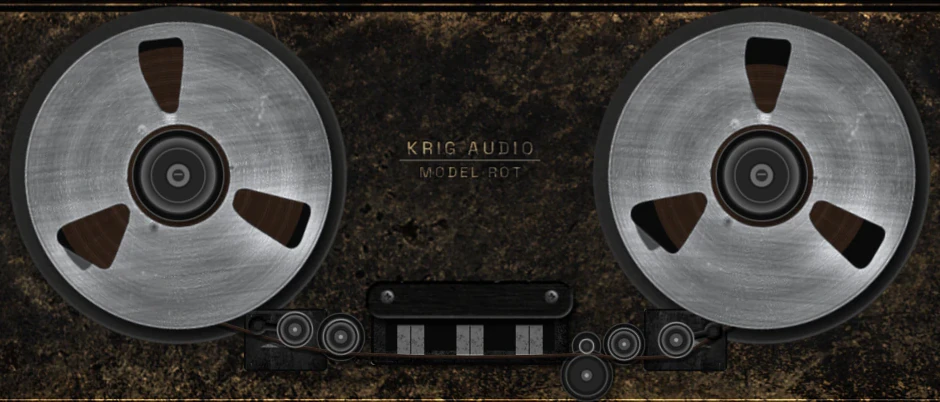
The two metal reels and the tape path are the physical centre of the interface. They show transport state, spin-up and spin-down, and they make the machine feel like a machine rather than a plugin window.
The reels are a visual instrument, not a meter. They do not replace the VU, the input and output meters, or the calibration display.
Two metal reels with a realistic tape path and head cover.
Transport state is shown separately from audio silence and effect state.
Reel motion is visual only and does not indicate signal level.
The two metal reels and the tape path through the heads02 / 08
Speed: 7.5, 15 and 30 IPS
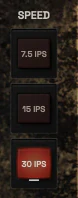
Speed is one of the main tone controls on a tape machine. 7.5, 15 and 30 IPS change the relationship between the recorded signal and the tape and head frequency response, so the same source will feel tighter or heavier depending on the setting. In Rot, speed changes the magnetic behaviour, not just the label.
Use 30 IPS when you want a tighter, more controlled low end and a cleaner top. Use 15 IPS when you want more weight and a more pronounced midrange push. 7.5 IPS is the loosest of the three and is intended for material where that character is the point.
Three speed positions: 7.5, 15 and 30 IPS.
Speed affects tape and head frequency response, not only the display.
Choose speed by the density and weight you want, then level-match.
The Speed keys: 7.5, 15 and 30 IPS03 / 08
Formulation positions
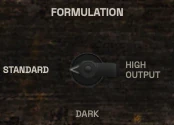
Formulation is the tape type, and it changes how the magnetic response behaves at a given level and speed. The three positions are labelled Standard, Dark and High Output.
Formulation is not decorative. Changing it changes saturation onset, high-frequency behaviour and low-end weight in a way you can hear. Treat the three positions as three different tape stocks with different compromises, not as a preset list.
Three formulation positions: Standard, Dark and High Output.
Formulation changes magnetic response at a given level and speed.
Choose by ear at matched level.
The Formulation switch: Standard, High Output and Dark04 / 08
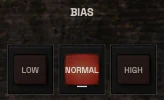
Bias: Low, Normal, High
Bias is the high-frequency pre-magnetisation that sets how the tape responds to high frequencies and how much distortion and high-frequency loss you get. Low, Normal and High bias are three different compromises: less high-frequency loss with more distortion, a balanced middle, or more high-frequency loss with less distortion.
Bias is a tone and character control, not a correctness switch. There is no single right setting. Choose it by what the source needs and by what the rest of the chain is doing, then check the result at matched level.
Three bias positions: Low, Normal and High.
Bias trades high-frequency response against distortion character.
There is no universally correct bias setting.
The Bias keys: Low, Normal and High05 / 08
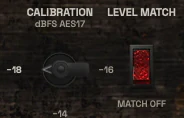
Calibration and level match
Calibration sets the reference level the machine is aligned to, and Level Match lets you compare the processed signal against the input at matched loudness. Without level matching, a louder signal will always sound better, and tape colour is easy to overdo.
Calibration is not a preset and it is not a loudness normaliser. It is the reference point that makes record level, bias and formulation behave predictably. Set it before you judge the tone, and use Level Match every time you A/B.
Calibration sets the machine reference level.
Level Match enables a fair A/B comparison.
Neither control is a loudness normaliser or a preset.
The Calibration control and the Level Match switch06 / 08
VU and meter source
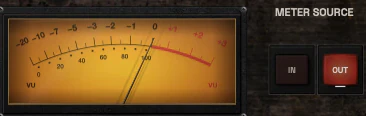
The central VU is an amber-lit analogue-style meter with a real needle, and the meter source switch selects whether it shows the input or the output. The VU is a calibrated instrument with defined ballistics, not a peak meter and not a decoration.
Input and output peak metering are separate from the VU. The VU shows average level in its own reference, while peak meters show peak level. Do not read the VU as dBFS peak, and do not treat the needle as a gain reduction display.
Amber VU with a real needle and defined ballistics.
Meter source switches between input and output.
VU is average level, not peak level and not gain reduction.
The VU meter and the meter source keys, IN and OUT07 / 08
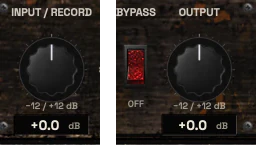
Input, output and bypass
Input and Record set how hard the signal hits the tape, and Output and Playback set the level coming back. Record level is the single most important control on a tape machine: it decides how much saturation and compression you get before speed, formulation and bias shape the result.
Bypass is a real bypass of the effect, not a hidden inactive branch. Use Input and Output together with Level Match to keep comparisons honest, and do not use Output as a substitute for record-level gain staging.
Input and Record control how hard the tape is driven.
Output and Playback set the return level.
Bypass is a real bypass, not a hidden branch.
The Input and Record control, and Bypass with the Output control08 / 08
Machine
Machine picks one of three voices for the tape path: Studio, Iron or Valve. Switching changes the character of the whole machine, so choose by ear at matched level, then shape the result with speed, formulation and bias.
Three machines: Studio, Iron and Valve.
Each changes the character of the tape path.
Compare them at matched level.
The Machine keys: Studio, Iron and Valve
Three ways to use it
Step-by-step starting points from real heavy sessions. Every mix is different; trust your ears over any recipe.
Drum bus glue at 15 IPS
Insert Rot on the drum bus and set speed to 15 IPS with Normal bias and the Standard formulation.
Raise Input and Record until the VU sits in a healthy average range and the kit starts to feel connected.
Use Level Match and A/B against the input to confirm the glue is real and not just louder.
Try the Iron variant and High Output formulation if you want more weight, then back off Input if the transients soften too much.
Set Output so the drum bus leaves Rot at the same level it entered.
Rhythm guitar density at 30 IPS
Insert Rot on the rhythm guitar bus and set speed to 30 IPS for a tighter low end and a cleaner top.
Set formulation to Standard and bias to Normal as a starting point.
Drive Input and Record until the pick attack starts to round and the midrange thickens.
Switch to the Valve variant and compare at matched level; keep the one that supports the arrangement.
Use Level Match before every A/B and print only after the tone survives in the full mix.
Mix bus reference touch
Insert Rot late in the mix bus chain, after tonal shaping and before final peak control.
Set speed to 30 IPS, Standard formulation and Normal bias, and keep Input conservative.
Use the VU on input to confirm you are not hitting the tape harder than intended.
Compare bypassed and engaged at matched level and keep the setting only if it adds density without smearing transients.
Re-check the mix at the same loudness before and after to avoid judging level instead of tone.
Before you reach for it
The mistakes we see most often with this kind of tool, and where it usually sits in a chain.
Common mistakes
Judging Rot without level matching, so louder always wins and tape colour gets overdone.
Driving Input and Record too hard and then blaming the speed or formulation for smeared transients.
Treating the VU as a peak meter or as gain reduction, and setting levels from the wrong display.
Where it fits
Rot sits where you want tape colour and density: on a drum bus, a guitar bus, a bass DI or amp blend, or the mix bus. An illustrative chain is Sigil for tonal shaping, then Rot for tape character, then Entomb for peak control, with Scry for objective level checks. Rot is not a mandatory stage and the order depends on the goal.
Factory presets
The weight, harmonic behaviour and level-dependent character of a professional reel-to-reel system. The factory library runs to dozens of presets, often more than a hundred, covering technical jobs, genres and instrument categories, sorted by category and searchable. Three of them are below.
Drum Bus Tape Weight
15 IPS, Standard formulation, Normal bias. Record level is pushed until the VU moves freely, so the tape compresses the kit softly and pulls the hits together.
Mix Bus 30 IPS Reference
30 IPS, the most extended and cleanest speed, with Record kept low. The tape adds a small amount of compression and top-end rounding and leaves the balance alone.
Heavy 7.5 IPS Character
7.5 IPS, where the low-end bump is strongest and the highs roll off earliest. Record is driven harder for a dark, dense sound on parts that should sit back.
Before KRIG we spent years mixing with other makers’ plugins, and we learned what a heavy session needs from a tool. So every plugin starts with the sound: DSP written to a measured target and tested until it behaves the same way every time.
Built from years at the deskWe mixed and mastered with plugins from many makers for years, on our own records and on other people’s, and the same problems kept costing us time: gates that chatter, saturation that smears a riff, limiters that flatten the kick. Each KRIG plugin starts from one of those problems.
DSP written to a measured targetWe write our own signal processing. Before the first line of code we decide what the plugin must do to the signal: the curve it draws, the harmonics it adds, the noise it must not. The DSP is measured against that target, and when the two disagree, the code goes back.
Tested again and againSine tones, sweeps, impulses and noise at the levels people mix at. Every control swept while audio plays, to catch clicks and zipper noise. Every sample rate and buffer size a session can run at. Then real multitracks, at matched level, judged by ear. Every new build runs it all again.
Meters that tell the truthEvery meter and display is fed signals whose values we already know, and has to show exactly that. A VU reads like a VU, gain reduction reads gain reduction, and nothing on the screen moves for show, so what you see is what the plugin is doing to your track.
Presets for every jobDozens of factory presets per plugin, many with more than a hundred: technical fixes, genre starting points and instrument categories, sorted and searchable. A beginner starts from the job in front of them; an engineer gets a tested reference to build on.
Buy once, keep itEvery KRIG plugin is a one-time purchase with a perpetual licence, never a subscription. A 14-day full-feature trial is planned, so you can judge each plugin in your own sessions before you pay.
Not sure it’s the right tool?
How Rot differs from its closest KRIG neighbours.
Pyre · Pyre is a four-character saturation and distortion plugin, while Rot is a full reel-to-reel tape workflow with speed, formulation and bias.
Sigil · Sigil is an eight-band parametric and dynamic EQ for surgical tone shaping, while Rot adds tape density and magnetic character rather than band control.
Entomb · Entomb is a clipper and limiter for peak control, while Rot is a tape character stage that does not replace final peak management.
Where Rot stands
The DSP is finished and Rot is in detailed testing. It goes on sale when it has passed measurement, real sessions, the interface check and listening. There are no release dates until a plugin is ready. Follow the roadmap
Research & specificationCompleted
Interface designCompleted
DSP implementationCompleted
Validation & QAIn progress
Release preparationPlanned
ReleasedPlanned
Details
What we can state today. System requirements, tested hosts and test results are published here before release.
Type
Reel-to-Reel Tape Machine
Status
DSP finished, in testing
Platforms
Built for Windows and macOS
Formats (planned)
VST3 for Windows and macOS, AU for macOS. No AAX
Presets
Factory library, see above
Made for
Beginners to mastering engineers
Licence (planned)
Perpetual, one-time purchase. Computers and updates confirmed when the plugins are finished
Trial (planned)
14-day full-feature trial
Rot questions
Rot is not a cassette or lo-fi effect, not a vinyl crackle generator, not a hardware emulation of any specific brand or model, and not Pyre Tape mode. It does not guarantee zero latency, zero aliasing or analog-identical results.
Yes. Rot is made for beginners and professionals. Start with speed at 15 or 30 IPS, Standard formulation, Normal bias and conservative Input, then use Level Match to compare. The deeper controls are there when you need them.
Rot is being built for Windows and macOS. It is finished and in detailed testing, not on sale yet, so availability, formats and host support are not confirmed yet.
Pyre is a four-character saturation and distortion plugin with Tube, Tape, Iron and Burn characters. Rot is a full reel-to-reel tape workflow built around record level, speed, formulation, bias and calibration. Pyre Tape is not Rot.
No. Studio, Iron and Valve are identifiers for three Rot machine variants. Judge each variant by listening at matched level.