A measurement-only plugin for peak, loudness, dynamics and stereo checks before the next mix decision. Scry is a measurement-only plugin for producers who need to know what the signal is doing before they reach for EQ, compression or limiting. Its interface is built as a working prototype; the audio processing is not implemented yet, so this page describes how it will work. The plan is a meter bridge where every reading has a defined source, window and unit, and where nothing is simulated to look busy.
Interface prototype, no DSP yet12 of 15Built for Windows and macOS
You are mixing a dense death metal session and the master bus feels loud but flat. The kick and snare are eating headroom you did not account for, the bass level drifts between sections, the rhythm guitars read wide but collapse when you check mono, and the integrated loudness keeps climbing without the mix getting better. You need numbers you can trust before you make the next move, not another plugin that changes the sound.
What it does
As designed, Scry measures the signal and displays it. It does not add EQ, saturation, gain riding, stereo enhancement or limiting. The planned meter bridge covers peak and sample-peak level, RMS, short-term and integrated loudness, loudness range, crest factor, stereo correlation and balance, with a mono preview as a monitoring function only. True peak is planned as a reading that will need a validated algorithm and a stated standard. Every instrument is intended to have a defined measurement point, window and ballistics, and the display will make clear which signal is being measured.
What it doesn’t do
It does not process, colour or correct the audio in any way; it is measurement-only.
It does not guarantee true-peak accuracy or any loudness standard compliance until the algorithm is validated and documented.
It does not replace your ears, your room or a full mastering suite.
It does not write automation or ride gain; that is Thrall's territory.
Inside the Scry prototype.
The interface is built and every control can be worked. The audio processing is not implemented yet, so the displays show labelled demo data, and controls can still change.
01 / 04
controls
The planned control set is built around choosing what you measure and how. Metering mode selection switches the bridge between level, loudness, dynamics and stereo views. Source labelling makes the tap point explicit, so you always know whether you are reading the plugin input, the post-fader signal or a monitoring-only path. Integrated reset, peak hold and history controls are planned so a reading can be captured and compared rather than watched once and lost.
Reference comparison and level matching are planned as monitoring aids, not as processing. Mono preview is planned strictly as a monitor function that does not alter the rendered audio. None of these controls exist in a build yet; they describe the intended design.
Metering mode selection and explicit input source labelling are planned.
Integrated reset, peak hold and history are planned for capturing readings.
The Levels, Loudness and Stereo/Phase tabs with the source selector, and the peak hold, reset, target and high-contrast controls02 / 04
meter bridge
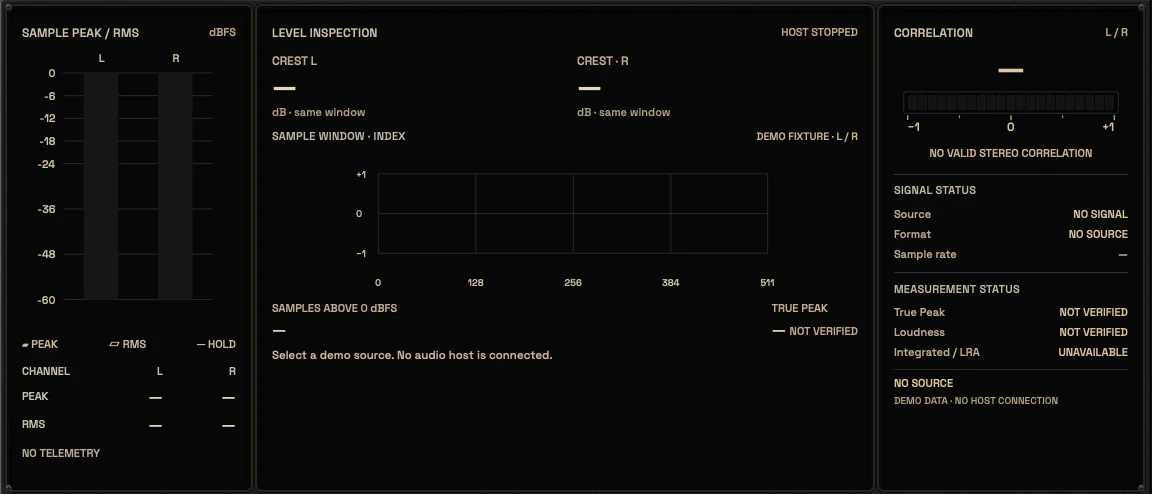
The planned UI is a large modular meter bridge rather than a single dial. Level, loudness, dynamics and stereo sections are intended to be readable at a glance and separable when you need detail. Each instrument is meant to carry its own unit and scale, so dBFS, LUFS, LU, dB and correlation values are never mixed into one ambiguous display. History views are planned so you can see whether a section drifted rather than judging a single moment.
The stereo section is planned to show correlation and balance with a mono preview control. The loudness section is planned to show momentary, short-term and integrated readings with a reset, and loudness range as a separate value. The dynamics section is planned to show crest factor over a defined window.
Each meter is planned to carry its own unit, scale and defined window.
Stereo correlation, balance and mono preview are planned as separate readings.
The meter bridge: sample peak and RMS, level inspection, correlation and status03 / 04
Signal and demo
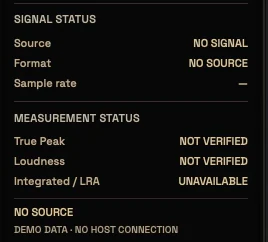
The rule for Scry is simple: a meter must mean what it displays. When a build exists, every reading will come from a defined tap with a stated window and ballistics, and the UI will say which signal is being measured.
This matters more for a metering plugin than for any other KRIG product, because the entire value is trust in the numbers. We will not animate a needle on a timer and call it a reading. We will not show a loudness number that has no validated algorithm behind it.
Live readings will require a defined tap, window and ballistics.
The signal and measurement status panel04 / 04
Where it fits in a session
Scry is planned to sit at the end of a channel or bus chain, or on the master, where it can observe the signal without changing it. On a drum bus it can show whether the crest factor is collapsing as you compress. On the master it can show whether integrated loudness is climbing while the mix is not improving. On a stereo guitar bus it can show correlation before you widen further.
Because it is measurement-only, placement is flexible and does not affect the render. The intended workflow is to measure, decide, then reach for the tool that actually solves the problem. Scry does not tell you what to do; it tells you what is happening so your next decision is informed.
Planned placement is end of chain or master, observing without processing.
Measurement-only design means placement does not change the render.
The intended loop is measure, decide, then process with another tool.
Three ways to use it
Step-by-step starting points from real heavy sessions. Every mix is different; trust your ears over any recipe.
Checking drum bus headroom
Place Scry at the end of the drum bus chain and confirm the source label reads the bus output.
Switch to the level view and note peak and RMS over a full chorus, not a single hit.
Switch to the dynamics view and read crest factor before and after your bus compression.
Reset the integrated reading and play the whole song section to see whether headroom drifts.
Decide whether to adjust the chain, then re-measure rather than trusting the first reading.
Verifying mono compatibility on wide guitars
Place Scry after the stereo guitar bus processing and confirm the source label.
Read correlation and balance across a dense rhythm section, not just a single chord.
Engage the planned mono preview as a monitor function and listen for level or tone collapse.
Compare correlation before and after any widening you add, and note the change.
Keep the mono preview as a check, not as a render setting, and confirm it is off before export.
Watching loudness while the mix is built
Place Scry on the master and confirm the source label reads the master output.
Reset integrated loudness and play the full song from start to finish without stopping.
Read momentary and short-term values during the loudest section to see transient behaviour.
Compare integrated loudness and loudness range against your intended target for the project.
Make mix decisions, then re-measure from a fresh reset rather than chasing a moving number.
Before you reach for it
The mistakes we see most often with this kind of tool.
Common mistakes
Treating a single momentary reading as the whole story instead of resetting and measuring a full section.
Chasing an integrated loudness number before the mix balance and dynamics are right.
Leaving a mono preview or monitoring-only function engaged and forgetting it before export.
Factory presets
Understand what the signal is doing before you process it. Scry measures rather than processes, so its library holds measurement setups instead of sound presets.
Tracking Peak Monitor
Layout for recording: input peak, peak hold and headroom in one view, with a history you can reset. You can see whether a take clipped without watching it live.
Drum Transient Analysis
Layout for drums: peak, RMS and crest factor side by side. A falling crest factor tells you how much punch your processing has taken out.
Stereo Phase Inspection
Layout for stereo checks: correlation, channel balance and mono preview. Use it to find phase problems on overheads and wide guitars before they reach the master.
Preset families: Tracking, Mixing, Drum Analysis, Mastering, Stereo Analysis and Reference Comparison. SCRY presets are monitoring layouts, not sound-changing presets. Measurement standards are verified before any claim.
Why KRIG Audio
Before KRIG we spent years mixing with other makers’ plugins, and we learned what a heavy session needs from a tool. So every plugin starts with the sound: DSP written to a measured target and tested until it behaves the same way every time.
Built from years at the deskWe mixed and mastered with plugins from many makers for years, on our own records and on other people’s, and the same problems kept costing us time: gates that chatter, saturation that smears a riff, limiters that flatten the kick. Each KRIG plugin starts from one of those problems.
DSP written to a measured targetWe write our own signal processing. Before the first line of code we decide what the plugin must do to the signal: the curve it draws, the harmonics it adds, the noise it must not. The DSP is measured against that target, and when the two disagree, the code goes back.
Tested again and againSine tones, sweeps, impulses and noise at the levels people mix at. Every control swept while audio plays, to catch clicks and zipper noise. Every sample rate and buffer size a session can run at. Then real multitracks, at matched level, judged by ear. Every new build runs it all again.
Meters that tell the truthEvery meter and display is fed signals whose values we already know, and has to show exactly that. A VU reads like a VU, gain reduction reads gain reduction, and nothing on the screen moves for show, so what you see is what the plugin is doing to your track.
Presets for every jobDozens of factory presets per plugin, many with more than a hundred: technical fixes, genre starting points and instrument categories, sorted and searchable. A beginner starts from the job in front of them; an engineer gets a tested reference to build on.
Buy once, keep itEvery KRIG plugin is a one-time purchase with a perpetual licence, never a subscription. A 14-day full-feature trial is planned, so you can judge each plugin in your own sessions before you pay.
Not sure it’s the right tool?
How Scry differs from its closest KRIG neighbours.
Entomb · Entomb clips and limits peaks to control level; Scry only measures and never processes the signal.
Legion · Legion shapes stereo width and Mid/Side balance; Scry reports correlation and balance without changing them.
Where Scry stands
The interface is built and every control can be worked; the audio processing is not implemented yet. Interface prototype: DSP not yet implemented. There are no release dates until a plugin is ready. Follow the roadmap
Research & specificationCompleted
Interface designCompleted
DSP implementationPlanned
Validation & QAPlanned
Release preparationPlanned
ReleasedPlanned
Details
What we can state today. System requirements, tested hosts and test results are published here before release.
Type
Metering & Monitoring
Status
Interface prototype: DSP not yet implemented
Platforms
Built for Windows and macOS
Formats (planned)
VST3 for Windows and macOS, AU for macOS. No AAX
Presets
Factory library, see above
Made for
Beginners to mastering engineers
Licence (planned)
Perpetual, one-time purchase. Computers and updates confirmed when the plugins are finished
Trial (planned)
14-day full-feature trial
Scry questions
Scry is not a processor. It does not add EQ, saturation, gain riding, stereo enhancement or limiting, and it does not write automation. It is a measurement-only plugin intended to show what the signal is doing so you can decide what to do next. It is also not a guarantee of true-peak accuracy or loudness compliance until those algorithms are validated and documented.
The intent is yes. Clear defaults and a readable meter bridge should let a beginner see peak, RMS, loudness and stereo correlation without needing to understand every standard first. The deeper controls, such as window selection, reference comparison and K-metering, are intended for engineers who need them. As with any meter, the numbers support listening; they do not replace it.
KRIG plugins are being built for Windows and macOS. That is the intent for Scry as well.
Entomb is a clipper and limiter that shapes and controls peaks, with sample-peak ceiling behaviour and a detector that reduces intersample peaks without claiming true peak. Scry does not process at all; it measures level, loudness, dynamics and stereo so you can judge what Entomb or any other tool is doing. One acts on the signal, the other reports on it.
No. True peak and loudness readings are planned features that require a validated algorithm and a named standard before they can be claimed. Until that validation exists and is documented, treat those readings as design targets. We will not present an unvalidated number as a compliance guarantee.