Multiband dynamics processor that controls low, mid and high energy separately. Schism is a four-band dynamics plugin for producers who need to control one part of the spectrum without flattening the rest. It splits the signal into frequency zones, gives each zone its own detector and dynamic behaviour, then recombines them. Its interface is built as a working prototype; the audio processing is not implemented yet, so this page describes how it will work. Built for Windows and macOS.
Interface prototype, no DSP yet8 of 15Built for Windows and macOS
You have a drum bus where the kick and bass are moving under a wall of guitars. A single broadband compressor pulls down the guitars every time the kick hits, so the snare loses its crack and the cymbals duck with the low end. You want the low band held steady while the mid and high bands stay open and aggressive. Schism is designed for exactly that situation: separate zones, separate dynamics, one output.
What it does
Schism is a multiband dynamics processor. The input signal is divided into frequency zones by crossovers, each zone runs through its own detector and dynamic stage with independent threshold, ratio, attack, release, knee and gain, and the zones are recombined at the output. A problem in one frequency region can be controlled without changing the dynamics of the regions that are already working.
What it doesn’t do
It is not a broadband compressor with a frequency display; the bands are intended to process independently.
It is not an EQ or a resonance suppressor; it controls dynamics per zone, not static tone or moving resonances.
It is not a stereo widener, saturator or limiter.
Inside the Schism prototype.
The interface is built and every control can be worked. The audio processing is not implemented yet, so the displays show labelled demo data, and controls can still change.
01 / 05
Crossover and band zones
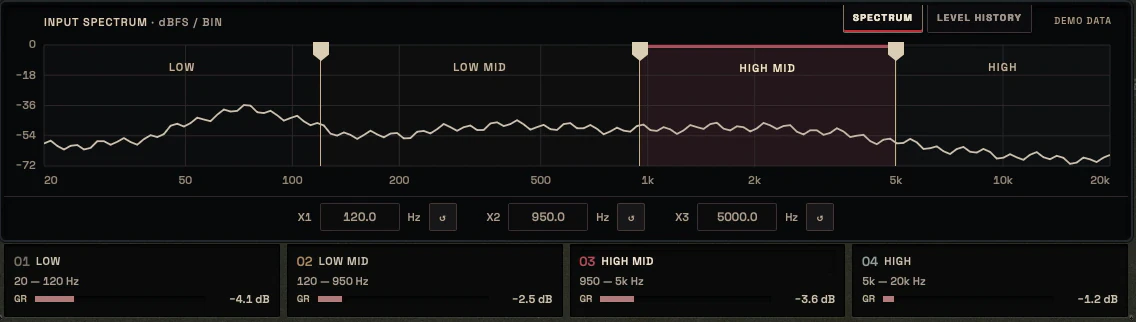
Schism divides the input into frequency zones using adjustable crossover points. Each zone is a real processing region with its own detector, not a visual overlay on a single compressor. The crossover frequencies are the main structural decision in the plugin because they define what counts as low, mid and high for the rest of the session.
The UI is planned around a central crossover spectrum that shows the active band regions and the selected band. Every configuration shown in the interface maps to a real signal path, with no decorative zones.
adjustable crossover frequencies between zones
per-band detector and dynamic stage
Crossover and phase behaviour treated as a core DSP question
The input spectrum split into four zones by three crossover points, with the band cards below02 / 05
Per-band dynamics controls
Each band carries its own Threshold, Ratio, Attack, Release, Knee and Gain, with Solo, Mute and Link available for auditioning and comparison. The selected band inspector shows precise values with units so a setting can be read, recalled and automated without guessing.
The design goal is that a producer can hold the low band steady while leaving the mid and high bands open, or control a harsh high band without touching the low end.
Threshold, Ratio, Attack, Release, Knee, Gain per band
Solo, Mute and Link for band auditioning
Selected band inspector with precise units
The band inspector: threshold, ratio, attack, release, knee and gain, with solo, mute and band bypass03 / 05
Metering and band activity
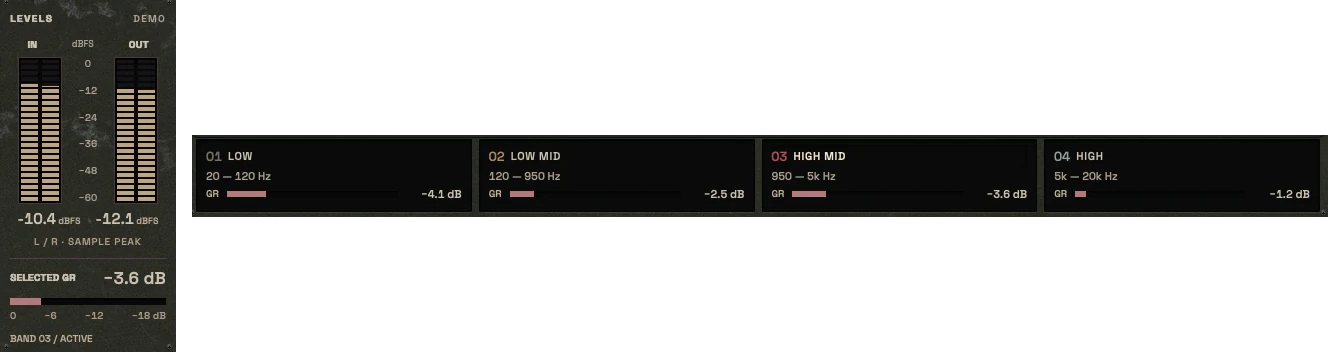
The planned metering shows independent gain reduction per zone, overall input and output levels, and a clear indication of which band is being auditioned or soloed. Per-band gain reduction is intended to be shown as its own measurement, separate from the overall output level, so the user can see which zone is working.
Band dots and regions in the crossover display are not EQ points. They represent processing zones and their activity.
Planned: independent gain reduction per zone
Planned: overall IN/OUT metering
The input and output level meters with the selected band’s gain reduction, and the gain reduction of each band04 / 05
Output stage and mix
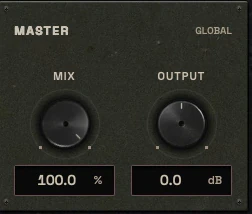
The output section includes Mix and Output controls so the processed signal can be compared against the dry signal at matched level. Level-matched comparison is the only honest way to judge whether multiband dynamics is helping or just changing loudness.
The output stage is not a limiter and does not claim to protect peaks. If peak control is needed after Schism, that is a separate decision and a separate tool.
Mix and Output for level-matched comparison
Not a limiter; no peak protection claim
Designed to sit before peak control, not replace it
The master panel with Mix and Output05 / 05
Interface and workflow
The planned interface follows the KRIG industrial hardware direction: a central crossover spectrum with active band regions, a selected band inspector, and clear per-band states for solo, mute and link. The layout is intended to make the current configuration readable at a glance, so the user always knows which zone is being adjusted.
The header follows the family standard with A/B, preset navigation and a real process indicator. The design is intended for beginners and professionals: sensible starting points for quick work, and precise controls for engineers who want to dial in each zone.
Planned: central crossover spectrum with active regions
Planned: selected band inspector and per-band states
Header with A/B, preset navigation and process indicator
The header with Undo and Redo, A/B and the preset field
Three ways to use it
Step-by-step starting points from real heavy sessions. Every mix is different; trust your ears over any recipe.
Drum bus low-end lock
Insert Schism on the drum bus and set crossovers so the low zone covers kick and low toms.
Set the low band threshold so gain reduction moves mainly on kick hits, with a moderate ratio and medium release.
Leave the mid and high bands at gentle settings or bypassed so snare crack and cymbal attack stay open.
Solo the low band to confirm it is controlling the kick without pulling the rest of the kit.
Level-match with the Mix control and compare against the dry signal before committing.
Guitar bus low-mid containment
Place Schism on the rhythm guitar bus and set a crossover around the low-mid region.
Set the low-mid band to reduce only the loudest low-mid movement, with a slower attack to preserve pick attack.
Keep the high band gentle so pick presence and upper-mid aggression are not softened.
Use band solo to hear exactly what the low-mid band is removing.
Compare level-matched against bypass and check that the guitars still feel heavy, not thinner.
Mix bus zone control
Insert Schism late in the mix bus chain, after tonal shaping and before peak control.
Set three zones and apply only small gain reduction in each, focusing on the zone that moves most.
Use conservative ratios and longer releases so the bus does not pump.
Check overall gain reduction per zone and confirm no single band is doing all the work.
Bypass and level-match to confirm the mix bus still breathes and the low end is stable.
Before you reach for it
The mistakes we see most often with this kind of tool, and where it usually sits in a chain.
Common mistakes
Using Schism as a broadband compressor and expecting it to glue the whole mix; it is designed for zone-specific control.
Setting aggressive ratios in every band at once, which flattens the spectrum in a way that is hard to hear until bypassed.
Judging the result without level matching, so louder is mistaken for better.
Where it fits
Schism is intended to sit where frequency-specific dynamics matter more than broadband control. On a drum bus it can follow tonal shaping and precede peak control. On a guitar bus it can sit after EQ and before character processing. On a mix bus it belongs late in the chain, after tonal moves and before final peak control, and only when one region of the spectrum is moving more than the rest. It is not a default insert and not a replacement for a broadband compressor when the whole signal needs cohesion.
Factory presets
Control separate frequency regions without forcing the whole signal to react together. The factory library runs to dozens of presets, often more than a hundred, covering technical jobs, genres and instrument categories, sorted by category and searchable. Three of them are below.
Kick Low-End Consistency
Only the low band is compressed, with a slow attack. Boomy hits come down to match the others, and the click above the crossover is not touched.
Drum Bus Cymbal Control
Only the top band works, on its own detector. Loud crashes pull down the top end, and kicks and toms below the crossover do not trigger any reduction.
Mix Bus Low-End Stability
Only the low band works, at a low ratio with slow timing. It holds the bass level steady across sections, and the mids and highs pass through unchanged.
Preset families: Bass, Guitars, Drums, Vocals, Instrument Buses, Mix Bus and Mastering.
Why KRIG Audio
Before KRIG we spent years mixing with other makers’ plugins, and we learned what a heavy session needs from a tool. So every plugin starts with the sound: DSP written to a measured target and tested until it behaves the same way every time.
Built from years at the deskWe mixed and mastered with plugins from many makers for years, on our own records and on other people’s, and the same problems kept costing us time: gates that chatter, saturation that smears a riff, limiters that flatten the kick. Each KRIG plugin starts from one of those problems.
DSP written to a measured targetWe write our own signal processing. Before the first line of code we decide what the plugin must do to the signal: the curve it draws, the harmonics it adds, the noise it must not. The DSP is measured against that target, and when the two disagree, the code goes back.
Tested again and againSine tones, sweeps, impulses and noise at the levels people mix at. Every control swept while audio plays, to catch clicks and zipper noise. Every sample rate and buffer size a session can run at. Then real multitracks, at matched level, judged by ear. Every new build runs it all again.
Meters that tell the truthEvery meter and display is fed signals whose values we already know, and has to show exactly that. A VU reads like a VU, gain reduction reads gain reduction, and nothing on the screen moves for show, so what you see is what the plugin is doing to your track.
Presets for every jobDozens of factory presets per plugin, many with more than a hundred: technical fixes, genre starting points and instrument categories, sorted and searchable. A beginner starts from the job in front of them; an engineer gets a tested reference to build on.
Buy once, keep itEvery KRIG plugin is a one-time purchase with a perpetual licence, never a subscription. A 14-day full-feature trial is planned, so you can judge each plugin in your own sessions before you pay.
Not sure it’s the right tool?
How Schism differs from its closest KRIG neighbours.
Shackle · Shackle is a stereo compressor for broadband dynamics and bus cohesion, while Schism controls dynamics separately per frequency zone.
Exorcise · Exorcise targets moving resonances inside one signal, while Schism controls the dynamic behaviour of whole frequency regions.
Hollow · Hollow uses a second key signal to duck specific frequencies, while Schism processes the main signal's own zones independently.
Where Schism stands
The interface is built and every control can be worked; the audio processing is not implemented yet. Interface prototype: DSP not yet implemented. There are no release dates until a plugin is ready. Follow the roadmap
Research & specificationCompleted
Interface designCompleted
DSP implementationPlanned
Validation & QAPlanned
Release preparationPlanned
ReleasedPlanned
Details
What we can state today. System requirements, tested hosts and test results are published here before release.
Type
Multiband Dynamics
Status
Interface prototype: DSP not yet implemented
Platforms
Built for Windows and macOS
Formats (planned)
VST3 for Windows and macOS, AU for macOS. No AAX
Presets
Factory library, see above
Made for
Beginners to mastering engineers
Licence (planned)
Perpetual, one-time purchase. Computers and updates confirmed when the plugins are finished
Trial (planned)
14-day full-feature trial
Schism questions
Schism is not a broadband compressor, an EQ, a resonance suppressor or a limiter.
Yes. The plan is to provide clear defaults and starting points so a beginner can get useful results quickly, while the per-band controls give professionals room to work precisely. Nothing here is a promise of a finished beginner workflow until the build exists.
KRIG plugins are being built for Windows and macOS.
Shackle is a stereo compressor that controls the overall dynamic envelope of a signal. Schism splits the signal into frequency zones and controls each zone's dynamics separately, so a problem in the low end does not force gain reduction across the whole spectrum.
No. Schism is intended for situations where one frequency region needs different dynamic treatment than the rest. When the whole mix needs cohesion, a broadband compressor is the more appropriate tool, and Schism is not designed to replace it.