Eight-band parametric and dynamic EQ for surgical tone shaping in dense metal mixes. Sigil is an eight-band parametric EQ with per-band dynamic response, built for mixes where rhythm guitars, bass, kick and vocals fight for the same space. It gives you precise static moves and band-specific dynamic control in one graph. It is finished and in testing.
DSP finished, in testing2 of 15Built for Windows and macOS
You have a wall of double-tracked rhythm guitars sitting across the low mids, and the bass disappears every time the guitars lock into a chug. A static cut at 250 Hz thins the guitars in the open sections where nothing masks the bass, so you end up automating the EQ or settling for a compromise. Meanwhile the snare has a ring around 700 Hz that only shows up on certain hits, and the harsh vocal needs presence without the 3 kHz bite that makes it sit on top of everything.
What it does
Sigil gives you eight EQ bands with user-set frequency, gain, Q and filter type, plus an optional dynamic response per band. In dynamic mode a band only moves when the signal in that region crosses a threshold, so a cut can open up during loud sustained passages and relax when the part is exposed. Static and dynamic behaviour live in the same band list, so you can combine a fixed low cut with a dynamic mid cut and a static presence shelf without leaving the graph.
What it doesn’t do
It does not detect and suppress resonances automatically; that is Exorcise.
It does not use a second signal as a key for spectral ducking; that is Hollow.
It is not a multiband compressor with per-band crossover dynamics; that is Schism.
It is not a mastering-grade linear phase EQ, and no phase or latency claim is made here.
Inside Sigil.
Every part of the real interface, explained: what it does, and why it matters in a heavy mix.
01 / 06
Spectrum and EQ graph, kept separate
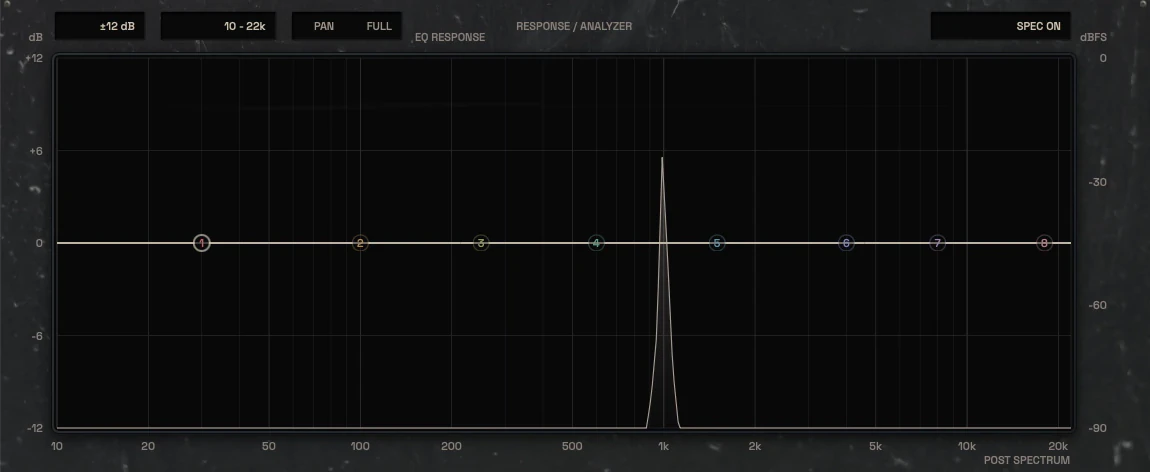
The analyzer is a real FFT of the incoming signal with a Hz axis, drawn behind the EQ curve. The EQ transfer graph is a separate layer that shows what the bands are doing, not what the signal contains. Keeping them visually distinct means you can read the source and your moves independently instead of guessing which line is which.
Zoom is treated as a working tool, not decoration. You can expand a region to place a narrow notch or a dynamic band with the precision the problem needs, then zoom back out to check the whole picture. Band nodes are colour-coded by function so the selected band, its inspector and the graph always agree.
Real FFT spectrum with Hz axis, separate from the EQ transfer curve
Eight band nodes with a floating inspector for the selected band
Zoom for precise placement of narrow and dynamic bands
The EQ response over the live spectrum, with dB and dBFS scales and the Hz axis02 / 06
Eight bands, static or dynamic
Each band has frequency, gain, Q and type, with an enable switch and a dynamic enable. Filter types cover the familiar bell, cut, shelf and notch categories where the current source supports them, and the slope for low and high cuts lives inside the type menu rather than as a permanent global control. Dynamic bands add threshold, range, attack and release.
The modifier workflow is deliberate: Ctrl plus horizontal drag changes only Q with frequency locked, and Shift plus vertical drag changes only gain with frequency locked. That keeps you from accidentally moving a band you have already placed. Direction and parameter range are being tested before this is treated as final.
Per-band dynamic enable with threshold, range, attack and release
Ctrl drag changes Q only, Shift drag changes gain only
Low and high cut slopes live in the type menu
The eight band nodes on the curve and the eight band switches below the graph03 / 06
The band inspector
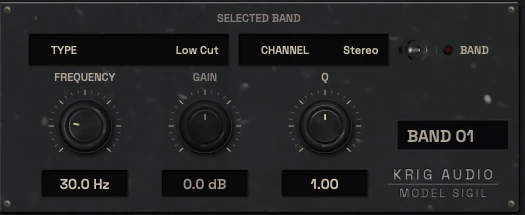
The selected band gets a dedicated inspector with exact dB, Hz and Q values and a clear readout of whether it is static or dynamic. This is where you make the precise move: type the frequency, set the Q, decide the gain, then switch dynamic on if the problem is intermittent rather than constant.
The band list shows every band with its status so you can see the whole EQ at a glance without hunting nodes on the graph. A/B and preset state sit in the header, and automation and state restore are tested separately before any of that is described as settled.
Exact dB, Hz and Q readouts for the selected band
Band list with per-band status and dynamic state
A/B and preset navigation in the header
The selected-band inspector: type, channel, frequency, gain and Q04 / 06
Band-specific dynamic response
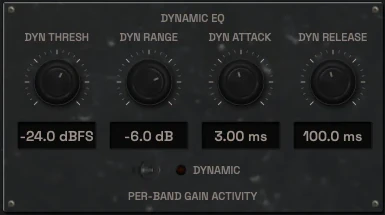
A dynamic band responds to level inside its own frequency region. Set a threshold and a range, and the band applies up to that range of gain change only when the region crosses the threshold. Attack and release shape how quickly it reacts, which matters when the problem is a sustained ring rather than a transient.
This is not a resonance detector. You choose the frequency and the band does what you told it to do. If the harshness moves around inside the performance, a wider Q and a moderate range usually behaves better than a narrow band chasing a moving target.
Threshold and range define how far the band can move
Attack and release shape the response to sustained problems
You choose the frequency; nothing is detected automatically
The dynamic EQ panel: threshold, range, attack and release for the selected band05 / 06
Output, trim and gain staging
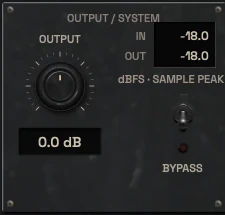
Output trim lets you level-match before and after so a boost does not win the comparison by being louder. The output stage is where you check that the EQ moves have not pushed peaks somewhere you did not intend, especially on a bus or a master where accumulated gain adds up.
Gain staging through the plugin is straightforward: the curve does the tonal work, the output trim restores the level you started with. If you are using Sigil on a guitar bus with several dynamic bands, check the output meter against the input before you decide the move is better.
Output trim for level-matched A/B
Input and output metering to catch accumulated gain
Useful on buses and masters where small moves add up
The output panel with output trim, input and output readouts and bypass06 / 06
A/B and before/after
A/B lets you hold two states of the same session and switch between them without losing your place. Combined with output trim, it is the honest way to judge whether a cut actually helped or just changed the tone. The dirty state indicator tells you when the current setting differs from the stored preset.
Before and after is not only about the graph. Listen for what the move did to the attack of the source, not just the balance. A low-mid cut that cleans up the mud can also remove body from the snare, and the A/B is where you catch that.
Two-state A/B with dirty state indication
Level-matched comparison via output trim
Judge attack and body, not only tonal balance
The header: Undo and Redo, the A/B switch and the preset field
Three ways to use it
Step-by-step starting points from real heavy sessions. Every mix is different; trust your ears over any recipe.
Rhythm guitar low-mid cleanup
High-pass the double-tracked rhythm bus until the sub content is gone but the body remains.
Place a wide bell around the low mids and cut until the bass has room, checking the open sections where nothing masks it.
Switch that band to dynamic with a moderate range so the cut deepens during the dense chugs and relaxes in the exposed parts.
Add a narrow static cut on the pick harshness if it is constant, or a dynamic band if it only appears on certain attacks.
Level-match with output trim and A/B against the unprocessed bus before committing.
Snare ring and body balance
Find the ring frequency with a narrow boost and sweep until the snare rings back at you.
Invert that boost into a cut and widen the Q until the ring is controlled without hollowing the shell.
If the ring only appears on harder hits, enable dynamic on that band with a threshold set just above the normal hits.
Check the body region separately and add a small static shelf if the snare lost weight.
Compare against the overheads to make sure the snare still sits in the kit.
Harsh vocal presence without bite
Cut the low-mid mud with a wide bell until the vocal stops competing with the guitars.
Add presence with a gentle shelf or bell and stop before the 3 kHz region starts to bite.
Place a dynamic band on the bite region with a range that only engages on the loudest sustained notes.
Set attack and release so the band does not pump on fast consonants.
Level-match and check the vocal against the full mix, not soloed.
Before you reach for it
The mistakes we see most often with this kind of tool, and where it usually sits in a chain.
Common mistakes
Using narrow high-Q cuts for broad tonal problems, which leaves the mix hollow and phase-shifted around the cut.
Leaving output trim untouched so a boosted setting wins the A/B by being louder rather than better.
Setting dynamic bands with too fast an attack and release so they pump on transients instead of responding to sustained problems.
Where it fits
Sigil usually sits early on a source or bus, after any noise or bleed control and before character and dynamics. On a snare chain that means after bleed cleanup and before saturation or transient shaping. On a guitar bus it comes before any saturation stage so you are shaping the raw tone rather than the harmonics. On a mix bus it sits before broad dynamics and peak control, making small tonal corrections rather than large moves. These are illustrative positions; the right order depends on what the source actually needs.
Factory presets
Remove masking, restore clarity and control changing tonal problems. The factory library runs to dozens of presets, often more than a hundred, covering technical jobs, genres and instrument categories, sorted by category and searchable. Three of them are below.
Guitar Mud Cleanup
A low cut under the lowest note of the riff, plus one wide cut in the low mids where layered guitars build up. Both are static, because this build-up is always there.
Harsh Vocal Resonance Control
One dynamic bell in the upper mids. Dyn Thresh is set so it cuts only on the loudest screams, Dyn Range limits how far it can go, and quieter phrases pass unchanged.
Bass and Kick Separation
Matching low bands for two instances. One cuts the bass where the kick has its thump, the other cuts the kick where the bass has its body, so each gets its own space.
Preset families: Individual Drums, Bass, Rhythm Guitar, Lead Guitar, Clean Vocals, Harsh Vocals, Instrument Buses, Mix Bus and Mastering.
Why KRIG Audio
Before KRIG we spent years mixing with other makers’ plugins, and we learned what a heavy session needs from a tool. So every plugin starts with the sound: DSP written to a measured target and tested until it behaves the same way every time.
Built from years at the deskWe mixed and mastered with plugins from many makers for years, on our own records and on other people’s, and the same problems kept costing us time: gates that chatter, saturation that smears a riff, limiters that flatten the kick. Each KRIG plugin starts from one of those problems.
DSP written to a measured targetWe write our own signal processing. Before the first line of code we decide what the plugin must do to the signal: the curve it draws, the harmonics it adds, the noise it must not. The DSP is measured against that target, and when the two disagree, the code goes back.
Tested again and againSine tones, sweeps, impulses and noise at the levels people mix at. Every control swept while audio plays, to catch clicks and zipper noise. Every sample rate and buffer size a session can run at. Then real multitracks, at matched level, judged by ear. Every new build runs it all again.
Meters that tell the truthEvery meter and display is fed signals whose values we already know, and has to show exactly that. A VU reads like a VU, gain reduction reads gain reduction, and nothing on the screen moves for show, so what you see is what the plugin is doing to your track.
Presets for every jobDozens of factory presets per plugin, many with more than a hundred: technical fixes, genre starting points and instrument categories, sorted and searchable. A beginner starts from the job in front of them; an engineer gets a tested reference to build on.
Buy once, keep itEvery KRIG plugin is a one-time purchase with a perpetual licence, never a subscription. A 14-day full-feature trial is planned, so you can judge each plugin in your own sessions before you pay.
Not sure it’s the right tool?
How Sigil differs from its closest KRIG neighbours.
Exorcise · Exorcise finds and suppresses moving resonances inside one signal automatically, while Sigil only moves the bands you place yourself.
Hollow · Hollow ducks the main signal using a second key signal, while Sigil works on one signal at a time with no external key.
Schism · Schism splits the signal into frequency zones with per-band compression, while Sigil shapes tone with EQ bands and optional per-band dynamics.
Where Sigil stands
The DSP is finished and Sigil is in detailed testing. It goes on sale when it has passed measurement, real sessions, the interface check and listening. There are no release dates until a plugin is ready. Follow the roadmap
Research & specificationCompleted
Interface designCompleted
DSP implementationCompleted
Validation & QAIn progress
Release preparationPlanned
ReleasedPlanned
Details
What we can state today. System requirements, tested hosts and test results are published here before release.
Type
Parametric / Dynamic EQ
Status
DSP finished, in testing
Platforms
Built for Windows and macOS
Formats (planned)
VST3 for Windows and macOS, AU for macOS. No AAX
Presets
Factory library, see above
Made for
Beginners to mastering engineers
Licence (planned)
Perpetual, one-time purchase. Computers and updates confirmed when the plugins are finished
Trial (planned)
14-day full-feature trial
Sigil questions
It is not an automatic resonance suppressor, not a cross-signal sidechain ducker and not a multiband compressor. It is an eight-band EQ where you place every band and decide whether it is static or dynamic.
Yes. The default state is a flat curve with clear band nodes and exact readouts, so a first move is as simple as picking a band, setting a frequency and cutting. The dynamic controls are there when you need them, not required to get started.
KRIG plugins are being built for Windows and macOS. Sigil is finished and in detailed testing, not on sale yet, so no availability or download claim is made here.
Exorcise detects resonances that move during a performance and suppresses them automatically inside one signal. Sigil is manual: you choose the frequency, gain and Q, and optionally let that band respond dynamically to level. Use Sigil when you know what to cut, Exorcise when the problem moves and you want it found for you.
No. Sigil processes one signal. If you need one source to make room for another based on a key signal, that is Hollow.