Reverb for placing aggressive sounds in space without burying their definition. Catacomb is a reverb designed for dense, aggressive mixes where space must not smear transients or flood the low end. It separates early reflections from the late diffuse tail so you can place a snare, a vocal or a guitar bus in a room without losing the pick attack or the punch. Its interface is built as a working prototype; the audio processing is not implemented yet, so this page describes how it will work.
Interface prototype, no DSP yet10 of 15Built for Windows and macOS
You have a snare that needs size on a death metal record, but every plate you try pushes the blast-beat kick and the rhythm guitars into a wash, and the pick attacks on the guitar bus turn to mush the moment the decay passes two seconds. You want the snare to sit in a dark room, not to disappear into one.
What it does
Catacomb is an algorithmic reverb built around two separately shaped stages: early reflections that define proximity and geometry, and a late diffuse tail shaped by decay, size, diffusion and spectral damping. You can push the tail long and dark for doom and black metal atmosphere while keeping the early stage short and controlled so transient information survives. Pre-delay, early/late balance, width and low/high damping are the main tools for keeping the reverb out of the way of the dry signal.
What it doesn’t do
It is not a convolution reverb and does not load impulse responses.
It is not a delay; separate repeats and modulation belong to Revenant.
Inside the Catacomb prototype.
The interface is built and every control can be worked. The audio processing is not implemented yet, so the displays show labelled demo data, and controls can still change.
01 / 05
Early and late, shaped separately
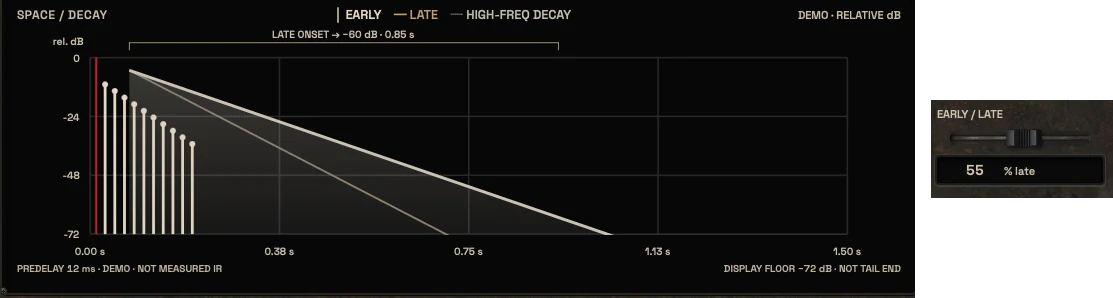
The signal model splits the reverb into an early reflection stage and a late diffuse tail, each with its own level and character. Early reflections give the sense of a nearby surface and help a source sit in a defined space; the late tail provides the length and the atmosphere. Balancing the two is the main way to get size without smearing the dry transient.
Because the two stages are separate, a short early stage with a long dark tail is a valid starting point for doom and black metal, while a longer early stage with a shorter tail suits drum room work.
Separate early reflection and late tail stages
Early/late balance as a primary control
The space and decay display with early reflections and the late tail, and the early/late balance slider02 / 05
Decay, size and diffusion
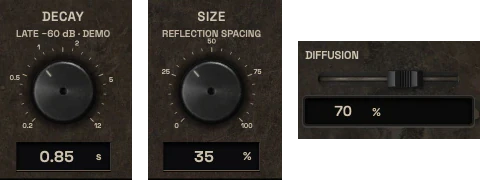
Decay sets how long the tail runs, expressed in seconds so you can reason about it against the tempo and the arrangement. Size changes the apparent dimensions of the space, and diffusion controls how dense or grainy the tail becomes. These three interact: a long decay with low diffusion sounds sparse and separated, while high diffusion fills the gaps and can mask detail.
All three are planned controls. No ranges, curves or fixed values have been approved, and none should be treated as final until the DSP design is settled.
Decay in seconds
Size and diffusion as separate controls
The Decay and Size controls, and the Diffusion slider03 / 05
Damping and frequency control
Low and high damping shape which parts of the spectrum the tail occupies and how quickly they fade. Cutting the low end of the reverb keeps kick and bass weight in the dry signal, which matters in dense metal mixes where low-mid buildup is the usual failure. High damping darkens the tail for cold, distant ambiences.
The design includes low and high damping plus optional pre/post EQ or low/high cuts. Which of these ship, and in what form, is still open.
Low and high damping
Pre/post EQ or low/high cuts
The Damping, Low Cut and High Cut sliders04 / 05
Pre-delay, width and mix
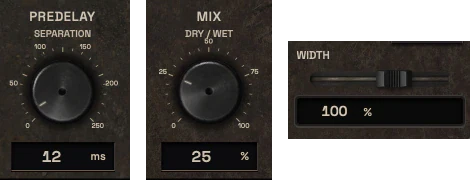
Pre-delay separates the reverb from the dry attack, which is the single most useful move for keeping a snare crack or a vocal consonant readable inside a large space. Width controls the stereo spread of the tail, and mix sets the wet/dry balance for insert use.
Ducking and hold are listed as options only if approved. They are not committed features, and no behavior should be assumed until the design is confirmed.
Pre-delay for transient separation
Stereo width control
Ducking and hold are unapproved options
The Predelay and Mix controls, and the Width slider05 / 05
The chamber UI
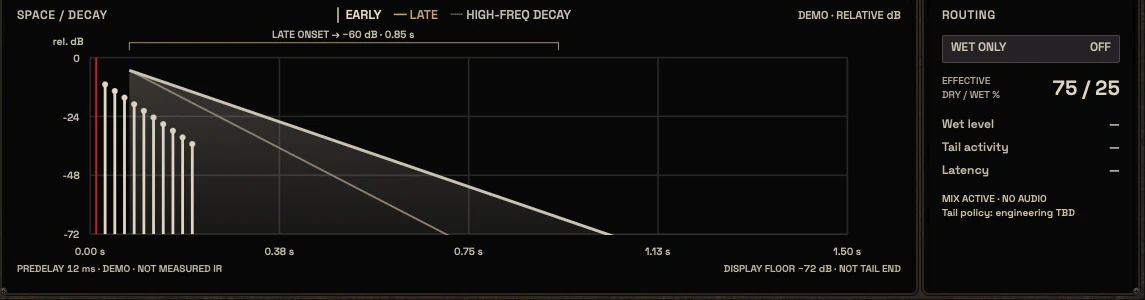
The central visual is a physical chamber motif, not a cathedral or fantasy architecture. It is intended to show the tail over time with the early and late zones marked, the decay in seconds, and a frequency damping view. Wet and dry are shown as separate, readable states.
Until real signal exists, any analysis in the display is a design metaphor and is labelled as such.
Chamber motif, no generic cathedral imagery
Early and late zones shown on a time view
All analysis is a metaphor until real signal exists
The chamber display with the routing panel
Three ways to use it
Step-by-step starting points from real heavy sessions. Every mix is different; trust your ears over any recipe.
Snare size without losing the crack
Insert Catacomb on a snare aux and set a short pre-delay so the transient stays ahead of the tail.
Keep the early stage moderate for a sense of a nearby room and push decay until the tail covers the gap between hits.
Cut low damping so the reverb does not add weight under the kick, and darken the high end slightly.
Blend the wet signal under the dry snare until the size is felt but the crack is still leading.
Check against the full drum bus, not solo, and reduce decay if the blast beats start to blur.
Doom guitar atmosphere
Place Catacomb on a guitar bus send rather than the direct chain.
Set a long decay with high diffusion and strong high damping for a dark, wide tail.
Lower the early reflection level so the space feels distant rather than close.
Widen the stereo image and confirm mono compatibility before committing.
Ride the send so the atmosphere appears in sustained sections and steps back under fast riffing.
Harsh vocal depth in a guitar wall
Send the vocal to Catacomb with a pre-delay long enough to clear the consonants.
Use a short early stage and a moderate dark tail so the voice sits in a space, not a hall.
Damp the low end so the reverb does not compete with the guitars in the low mids.
Keep the wet level low and compare against the dry vocal at matched loudness.
If the voice still fights the guitars, address the frequency conflict with a dedicated tool before adding more reverb.
Before you reach for it
The mistakes we see most often with this kind of tool, and where it usually sits in a chain.
Common mistakes
Using a long decay on a dense drum bus and blaming the reverb when the blast beats blur; shorten decay or reduce the send first.
Leaving the low end of the reverb open so it fights the kick and bass in the low mids.
Judging the reverb in solo instead of in the full mix, where masking actually happens.
Where it fits
Catacomb is intended to sit on an aux send or as a parallel insert after tonal and dynamic shaping, so the reverb receives a signal you already trust. A typical snare chain might run bleed control, then EQ, then optional saturation, then Catacomb on a send, with peak control and metering later in the chain. For guitars, place it after the tone-shaping stage and before any bus-level stereo or metering decisions. These are illustrative placements, not rules, and the right order depends on what the mix needs.
Factory presets
Create space and depth without washing out fast, dense arrangements. The factory library runs to dozens of presets, often more than a hundred, covering technical jobs, genres and instrument categories, sorted by category and searchable. Three of them are below.
Tight Snare Room
Early reflections forward in the balance with a short late tail and the lows damped. You hear a room around the hit, and it is gone before the next one.
Harsh Vocal Depth
Pre-delay keeps the dry scream in front, with a short tail and damped lows and highs behind it. The vocal gets depth and the words stay clear.
Clean Guitar Atmosphere
Long decay with high diffusion and a large size, weighted towards the late tail. Made for exposed clean passages where the reverb has room to be heard.
Preset families: Drum Rooms, Snare, Toms, Vocals, Clean Guitars, Lead Guitars, Instruments, Chambers, Halls and Atmospheric Effects.
Why KRIG Audio
Before KRIG we spent years mixing with other makers’ plugins, and we learned what a heavy session needs from a tool. So every plugin starts with the sound: DSP written to a measured target and tested until it behaves the same way every time.
Built from years at the deskWe mixed and mastered with plugins from many makers for years, on our own records and on other people’s, and the same problems kept costing us time: gates that chatter, saturation that smears a riff, limiters that flatten the kick. Each KRIG plugin starts from one of those problems.
DSP written to a measured targetWe write our own signal processing. Before the first line of code we decide what the plugin must do to the signal: the curve it draws, the harmonics it adds, the noise it must not. The DSP is measured against that target, and when the two disagree, the code goes back.
Tested again and againSine tones, sweeps, impulses and noise at the levels people mix at. Every control swept while audio plays, to catch clicks and zipper noise. Every sample rate and buffer size a session can run at. Then real multitracks, at matched level, judged by ear. Every new build runs it all again.
Meters that tell the truthEvery meter and display is fed signals whose values we already know, and has to show exactly that. A VU reads like a VU, gain reduction reads gain reduction, and nothing on the screen moves for show, so what you see is what the plugin is doing to your track.
Presets for every jobDozens of factory presets per plugin, many with more than a hundred: technical fixes, genre starting points and instrument categories, sorted and searchable. A beginner starts from the job in front of them; an engineer gets a tested reference to build on.
Buy once, keep itEvery KRIG plugin is a one-time purchase with a perpetual licence, never a subscription. A 14-day full-feature trial is planned, so you can judge each plugin in your own sessions before you pay.
Not sure it’s the right tool?
How Catacomb differs from its closest KRIG neighbours.
Revenant · Revenant is a delay with discrete repeats and modulation, while Catacomb is a reverb built around a diffuse tail.
Hollow · Hollow uses an external key signal to duck specific frequencies, while Catacomb adds space rather than removing conflict.
Legion · Legion shapes the stereo and mid/side field, while Catacomb creates the sense of a physical space.
Where Catacomb stands
The interface is built and every control can be worked; the audio processing is not implemented yet. Interface prototype: DSP not yet implemented. There are no release dates until a plugin is ready. Follow the roadmap
Research & specificationCompleted
Interface designCompleted
DSP implementationPlanned
Validation & QAPlanned
Release preparationPlanned
ReleasedPlanned
Details
What we can state today. System requirements, tested hosts and test results are published here before release.
Type
Reverb
Status
Interface prototype: DSP not yet implemented
Platforms
Built for Windows and macOS
Formats (planned)
VST3 for Windows and macOS, AU for macOS. No AAX
Presets
Factory library, see above
Made for
Beginners to mastering engineers
Licence (planned)
Perpetual, one-time purchase. Computers and updates confirmed when the plugins are finished
Trial (planned)
14-day full-feature trial
Catacomb questions
It is not a convolution reverb, not an impulse response loader, not a delay and not a physical room simulator.
The intent is yes. The design goal is clear defaults and a small set of meaningful controls, with deeper options for engineers who want them.
KRIG plugins are being built for Windows and macOS. That is the platform intent.
Revenant is a delay with separate repeats and modulation. Catacomb is a reverb whose job is a diffuse tail and a sense of space. They solve different problems and can be used together, but they are not substitutes for each other.
Yes. The factory presets on this page are the ones chosen for the library. The audio processing is not implemented yet, so their settings are checked again once it is, and we may add new presets when real sessions show a job the library does not cover.