Delay with separated repeats and modulation for depth without masking the performance. Revenant is a delay and modulation plugin designed for producers who need rhythmic depth, stereo movement and controlled feedback without washing out a dense metal mix. Its interface is built as a working prototype; the audio processing is not implemented yet, so this page describes how it will work. It is built for Windows and macOS, and it gives beginners clear starting points while leaving engineers deep control over time, feedback, filtering and stereo routing.
Interface prototype, no DSP yet11 of 15Built for Windows and macOS
You have a lead guitar solo that needs to sit behind the rhythm wall and answer the phrase without smearing the pick attack. A dotted eighth delay gives it movement, but the repeats keep colliding with the snare and the vocal, and the feedback tail turns into a wash that eats the center of the mix. You want the repeats to be audible as rhythm and space, not as a second, blurry performance.
What it does
Revenant is built around a delayed repeat path with a feedback loop. You control delay time in milliseconds or tempo-synced note divisions, feedback amount, left and right balance or ping-pong routing, and high and low cut filters inside the feedback path. Modulation controls let the repeats drift slightly in time or pitch, and stereo width shapes how the repeats sit around the center. The dry performance stays intact while the repeats are shaped as a separate, controllable layer, so you decide how much rhythm, color and space the delay adds.
What it doesn’t do
It is not a reverb; it creates discrete repeats, not a diffuse tail.
It is not a tape machine; tape-like color in the feedback path is not the Rot tape workflow.
It does not guarantee tempo sync or host transport behavior.
It does not replace arrangement or performance decisions, and it is not a fix for a part that does not work dry.
Inside the Revenant prototype.
The interface is built and every control can be worked. The audio processing is not implemented yet, so the displays show labelled demo data, and controls can still change.
01 / 06
Time, sync and repeat rhythm
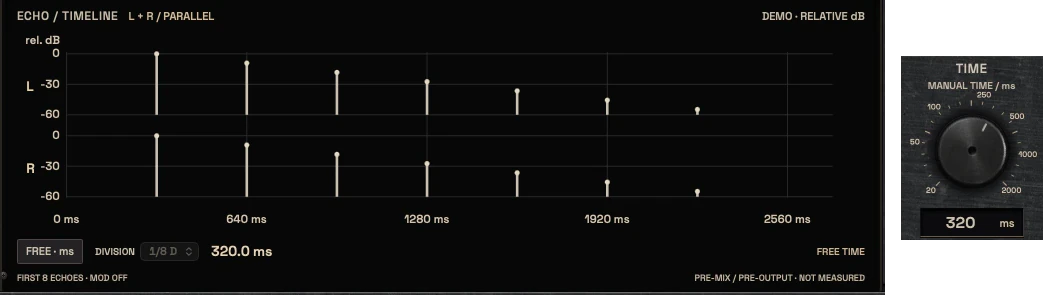
The delay time control works as both a millisecond value and a tempo-synced note division, so you can dial a specific rhythmic relationship or a free time for texture. Sync behavior depends on the host transport, and the plugin shows clearly when it is following host tempo and when it is not.
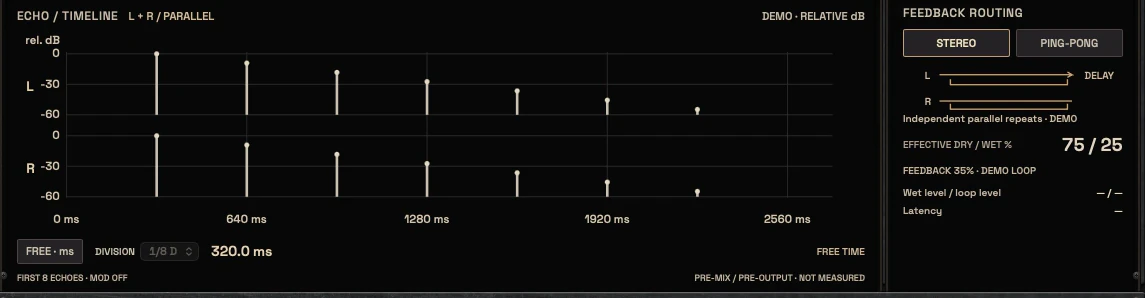
A timeline display shows the spacing and relative level of the first repeats, so you can see whether the delay is landing on the beat, between beats, or creating a dotted or triplet feel.
Delay time in ms and tempo note divisions
Sync status reflects real host transport
Timeline shows repeat spacing and level
The echo timeline with the free time and division setting, and the Time control02 / 06
Feedback, filters and stability
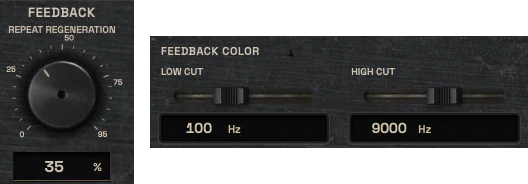
Feedback decides how long the repeats continue. High and low cut filters inside the feedback path let the tail darken or thin out as it repeats. This matters in dense mixes where a full-range feedback tail masks cymbals, vocals or snare ghost notes.
The UI shows when feedback is high enough to become unstable or self-oscillating.
Feedback amount with high and low cut in the loop
Filtering shapes the tail without changing the dry signal
High-feedback warning shows when the loop becomes unstable
The Feedback control and the feedback colour filters03 / 06
Stereo routing and modulation
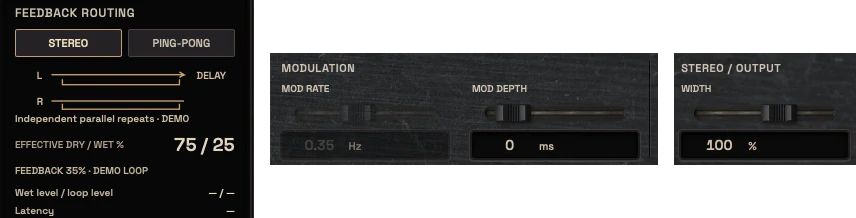
Stereo controls include left and right balance or a ping-pong routing choice, plus a stereo width control for the repeats. Ping-pong is a routing decision, not a quality guarantee, and the UI makes the difference between centered, alternating and widened repeats visible.
Modulation rate and depth controls add slow movement to the repeats. The goal is movement around the performance, not pitch instability over the dry signal.
Ping-pong and L/R balance routing
Stereo width affects repeats, not the dry center
Modulation rate and depth add slow movement
The feedback routing panel with stereo and ping-pong, the modulation sliders and the width slider04 / 06
Mix, output and bypass
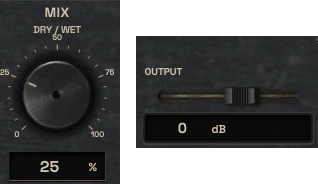
Mix and output controls let you use the delay in parallel or inserted, and make level-matched comparison possible. Bypass removes the delay path completely, not just the wet signal.
The dry path stays unchanged when the plugin is bypassed, and the output trim gives enough range to match the delayed signal against the dry.
Mix for parallel or inserted use
Output trim for level-matched comparison
Bypass removes the delay path, not only the wet meter
The Mix control and the Output slider05 / 06
UI and meters
The UI centers on a repeat timeline, a feedback path view, L/R routing and filter controls. The meters show input and output level, feedback amount and a stability indicator. Every display means what it shows.
Timeline and feedback graphics show real signal
Input and output meters are live
The echo timeline and the feedback routing panel06 / 06
Where it fits and what to avoid
Revenant works for lead guitar, clean guitar, harsh and clean vocals, snare throws, keys and atmospheric sections. It can sit after tonal shaping and before reverb, or in parallel on a send, depending on whether the repeats should be part of the source or a separate space.
Common mistakes are setting feedback too high in a dense mix, using delay to fix a part that needs arrangement work, and leaving the dry signal too loud so the repeats only add mud. The plugin is not a replacement for Catacomb when a diffuse tail is the goal, and it is not a tape emulation.
For lead, clean, vocal, snare and atmospheric sources
Can be inserted or used in parallel, depending on the goal
Not a reverb and not a tape machine
Three ways to use it
Step-by-step starting points from real heavy sessions. Every mix is different; trust your ears over any recipe.
Dotted eighth lead guitar
Insert Revenant after the amp and cab or after the tonal shaping chain on the lead guitar.
Set the delay time to a dotted eighth note division and confirm the host sync status.
Set feedback low enough that the repeats answer the phrase without filling the next bar.
Use the high and low cut in the feedback path to keep the tail away from the vocal and cymbal range.
Compare bypassed and active at matched output level before committing.
Short slap for aggressive vocals
Place Revenant on a vocal send or insert after the main vocal compression.
Set a short delay time in milliseconds rather than a long note division.
Keep feedback low and use the filters to darken the repeat slightly.
Check the repeat against the snare and rhythm guitars so it does not mask the consonant attack.
Automate the mix or output if the effect should only appear in specific phrases.
Stereo movement for clean guitar
Insert Revenant on a clean guitar track or bus.
Choose ping-pong or L/R balance routing and set the stereo width for the repeats.
Add slow modulation at low depth to keep the repeats from sounding static.
Filter the feedback path so the tail does not build up in the low mids.
Check mono compatibility before printing, since wide repeats can change in mono.
Before you reach for it
The mistakes we see most often with this kind of tool.
Common mistakes
Setting feedback too high in a dense mix so the repeats mask the snare, vocal or cymbal detail.
Using delay to fix a part that needs arrangement or performance work instead of shaping a part that already works dry.
Leaving the dry signal too loud and adding delay on top, which creates mud instead of depth.
Factory presets
Create rhythmic space, depth and movement while keeping clarity. The factory library runs to dozens of presets, often more than a hundred, covering technical jobs, genres and instrument categories, sorted by category and searchable. Three of them are below.
Lead Guitar Quarter-Note Echo
Synced to quarter notes with moderate feedback, and low and high cuts in the loop so each repeat gets darker and thinner. The echoes sit behind the dry lead.
Vocal Slapback Presence
One short repeat with feedback near zero. It thickens the vocal and adds depth, with no tail to wash over the next phrase.
Transition Delay Throw
Long synced time with high feedback and ping-pong routing, meant to be automated on single words or notes. It stays out of the mix until you throw into it.
Preset families: Lead Guitars, Clean Guitars, Vocals, Rhythmic Delays, Slapback, Stereo Delays, Modulated Delays and Atmospheric Effects.
Why KRIG Audio
Before KRIG we spent years mixing with other makers’ plugins, and we learned what a heavy session needs from a tool. So every plugin starts with the sound: DSP written to a measured target and tested until it behaves the same way every time.
Built from years at the deskWe mixed and mastered with plugins from many makers for years, on our own records and on other people’s, and the same problems kept costing us time: gates that chatter, saturation that smears a riff, limiters that flatten the kick. Each KRIG plugin starts from one of those problems.
DSP written to a measured targetWe write our own signal processing. Before the first line of code we decide what the plugin must do to the signal: the curve it draws, the harmonics it adds, the noise it must not. The DSP is measured against that target, and when the two disagree, the code goes back.
Tested again and againSine tones, sweeps, impulses and noise at the levels people mix at. Every control swept while audio plays, to catch clicks and zipper noise. Every sample rate and buffer size a session can run at. Then real multitracks, at matched level, judged by ear. Every new build runs it all again.
Meters that tell the truthEvery meter and display is fed signals whose values we already know, and has to show exactly that. A VU reads like a VU, gain reduction reads gain reduction, and nothing on the screen moves for show, so what you see is what the plugin is doing to your track.
Presets for every jobDozens of factory presets per plugin, many with more than a hundred: technical fixes, genre starting points and instrument categories, sorted and searchable. A beginner starts from the job in front of them; an engineer gets a tested reference to build on.
Buy once, keep itEvery KRIG plugin is a one-time purchase with a perpetual licence, never a subscription. A 14-day full-feature trial is planned, so you can judge each plugin in your own sessions before you pay.
Not sure it’s the right tool?
How Revenant differs from its closest KRIG neighbours.
Catacomb · Catacomb is a reverb with a diffuse tail, while Revenant creates discrete repeats with feedback and modulation.
Rot · Rot is a tape machine workflow, while Revenant is a delay; tape-like color in the feedback path is not the Rot tape process.
Legion · Legion shapes the stereo and Mid/Side field of a source, while Revenant uses stereo routing to place repeats around the dry performance.
Where Revenant stands
The interface is built and every control can be worked; the audio processing is not implemented yet. Interface prototype: DSP not yet implemented. There are no release dates until a plugin is ready. Follow the roadmap
Research & specificationCompleted
Interface designCompleted
DSP implementationPlanned
Validation & QAPlanned
Release preparationPlanned
ReleasedPlanned
Details
What we can state today. System requirements, tested hosts and test results are published here before release.
Type
Delay & Modulation
Status
Interface prototype: DSP not yet implemented
Platforms
Built for Windows and macOS
Formats (planned)
VST3 for Windows and macOS, AU for macOS. No AAX
Presets
Factory library, see above
Made for
Beginners to mastering engineers
Licence (planned)
Perpetual, one-time purchase. Computers and updates confirmed when the plugins are finished
Trial (planned)
14-day full-feature trial
Revenant questions
It is not a reverb and not a tape machine. It is a delay and modulation plugin whose interface prototype is built; the audio processing is not implemented yet.
Yes. The controls include clear starting points for time, feedback and mix, with deeper routing and modulation for engineers. Beginners should start with a simple note division, low feedback and a filtered tail, then adjust from there.
KRIG plugins are being built for Windows and macOS.
Catacomb is a reverb designed around early reflections and a diffuse late tail. Revenant is a delay designed around discrete repeats, feedback and modulation. They can be used together, but they solve different space problems.
No. Rot is a separate tape machine workflow. Revenant may offer filtering and modulation in the feedback path, but that is not the Rot tape process and should not be described as tape emulation.