Transient shaper that separates attack from sustain and reshapes their balance. Flay is a transient shaper for drums, bass and any source where the first hit and the body after it decide whether the part sits or disappears. Its interface is built as a working prototype; the audio processing is not implemented yet, so this page describes how it will work. Flay is built to shape onset and sustain directly, not to act as a compressor with renamed attack and release knobs.
Interface prototype, no DSP yet9 of 15Built for Windows and macOS
You have a kick that thumps but has no click, so it vanishes under the guitars no matter how much level you push. The snare is dull and the tom rings half a second too long, and every compressor you try either flattens the ghost notes or lets the tail through. You do not need more gain reduction. You need to change how much of the sound is the hit and how much is what comes after it.
What it does
Flay is designed to detect the onset transient of a sound separately from the body and sustain that follow, then raise or lower each part's relative amplitude over time. Attack and Sustain are independent bipolar controls, so you can add click without lengthening the tail, or shorten a tom ring without dulling the stick. This is not a global compressor with renamed attack and release parameters. The detector is meant to tell transient content from sustained content, and the amount controls are separate from any timing window. The exact detector behaviour and envelope design will be set by the DSP.
What it doesn’t do
It is not a compressor, limiter or gate, and it does not reduce overall level as its main job.
It does not remove bleed, noise or room from a recording; that is a gating and editing problem.
It does not add harmonic colour or saturation; that is Pyre and Rot territory.
It does not guarantee a result on every source; heavily compressed or clipped material gives the detector less to separate.
Inside the Flay prototype.
The interface is built and every control can be worked. The audio processing is not implemented yet, so the displays show labelled demo data, and controls can still change.
01 / 05
Attack and Sustain, separately
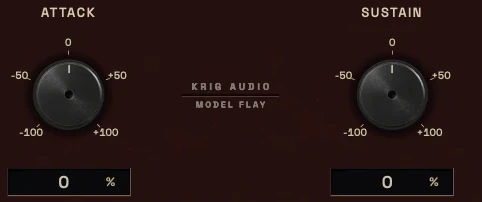
The core of Flay is two bipolar amount controls. Attack pushes or pulls the onset portion of the detected signal; Sustain pushes or pulls the body and tail after it. Because they are independent, adding snap to a snare does not automatically make the ring longer, and shortening a tom does not dull the stick attack.
Both controls are planned to work in dB of relative change, not in milliseconds. Timing lives in a separate Time/Window control that sets how the detector divides onset from body. That separation matters: confusing an amount in dB with a timing value in ms is the most common way transient tools get misread.
Attack and Sustain are independent bipolar controls, with the range to be set by the DSP design.
Amount is expressed in dB of relative change, not in time.
Time/Window sets the detector's onset-to-body split and is a separate parameter.
The Attack and Sustain controls, each from -100 to +10002 / 05
Detection you can steer
Sensitivity sets how much level the detector needs before it treats a rise as an onset, which matters on quiet ghost notes and on already-limited material. Time/Window decides how wide the onset region is: short windows catch fast stick attacks, longer windows catch slower bass plucks and room swells.
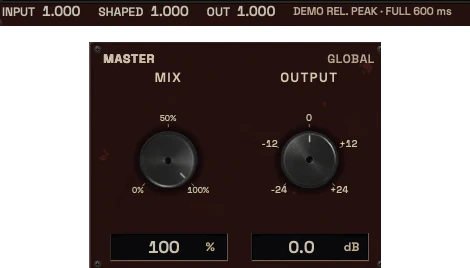
Stereo Link keeps both channels shaped together so a centred kick or snare does not shift image when only one side triggers. Mix and Output allow level-matched comparison, which matters here because a louder attack always sounds better until you match it.
Sensitivity controls how easily quiet hits register as onsets.
Stereo Link prevents image shift on centred sources.
Mix and Output exist specifically for level-matched A/B listening.
The Envelope, Detection and Focus tabs, the demo source and the detector settings03 / 05
The timeline view
It should show what the detector decided, not a decorative waveform.
A second trace shows the gain action Flay is applying over that same timeline, so you can see whether you are adding attack, cutting body, or both. If the input feed is not available, the display must say so rather than animate a fake signal.
Onset marker, attack region and sustain segment are visually distinct.
Gain action is shown as its own trace, separate from the input envelope.
The transient envelope: input and shaped traces over 600 ms04 / 05
Meters and what they mean
Planned metering is input and output level, a gain-action readout in dB showing positive and negative change separately, and a detector state indicator. Attack gain and sustain gain are shown as two separate numbers because they are two separate operations and summing them into one value hides what you did.
Every meter must carry a defined unit and ballistics. The design rule is that a display which cannot show real signal shows nothing.
Attack change and sustain change are reported separately in dB.
Input and output level meters are planned as separate instruments.
Meter units and ballistics will be set during implementation.
The input, shaped and output readouts, and the master Mix and Output controls05 / 05
Where it sits and what it is not
Flay is a shaping stage, not a dynamics stage. On a snare chain it typically comes after cleanup and tone work and before peak control, so you shape the transient before you limit it. On a drum bus it can sit before bus compression or after it, depending on whether you want to feed the compressor a sharper or softer hit.
It is deliberately not a compressor, not a gate and not a saturation unit. If the problem is level consistency across a performance, that is Shackle or Thrall. If the problem is that the hit itself is wrong, that is Flay.
Shaping stage, placed before peak control in a typical chain.
Distinct from Shackle compression and Thrall level riding.
Not a substitute for editing bleed or noise.
Three ways to use it
Step-by-step starting points from real heavy sessions. Every mix is different; trust your ears over any recipe.
Kick click under a guitar wall
Insert Flay on the kick channel and set Time/Window short so the beater strike is isolated from the sub tail.
Raise Attack until the click reads in the full mix, then lower Output to match the bypassed level.
Leave Sustain near zero first; only cut it if the sub tail is masking the bass.
A/B against bypass at matched level and check the low end on a second reference.
If the kick still disappears, the conflict is frequency masking, so check Hollow against the bass rather than pushing Attack further.
Snare crack without a longer ring
Set Sensitivity so ghost notes do not trigger the detector as full onsets.
Add Attack for stick definition and confirm the ring has not grown by watching the sustain readout.
Cut Sustain slightly if the shell ring is crowding the tom and vocal range.
Check Stereo Link so the snare stays centred when only one overhead side leads.
Print or freeze only after a level-matched comparison against the unshaped snare.
Shortening a tom decay in a dense fill
Set Time/Window long enough to include the tom's natural decay in the sustain region.
Cut Sustain until the ring stops crowding the next hit, keeping Attack near zero so the stick stays intact.
Raise Sensitivity if quiet hits in the fill are being skipped by the detector.
Compare the fill in context, not soloed, because a shortened tom often reads differently in the bus.
If the tom now sounds choked rather than controlled, back off Sustain and treat the room instead with Catacomb settings.
Before you reach for it
The mistakes we see most often with this kind of tool.
Common mistakes
Judging the result without level matching, so a louder attack always wins the comparison.
Pushing Attack to fix a masking problem that is actually a frequency conflict with the bass or guitars.
Using Flay on already heavily limited material and expecting the detector to find onsets that are no longer there.
Factory presets
Adjust the balance between attack and sustain without relying on conventional compression. The factory library runs to dozens of presets, often more than a hundred, covering technical jobs, genres and instrument categories, sorted by category and searchable. Three of them are below.
Snare Crack Enhancement
Attack up, Sustain unchanged, with a short Time/Window. It raises the first moment of each hit, which brings the crack forward with no EQ boost.
Tom Sustain Control
Sustain down, Attack unchanged. It shortens the ring after each hit, so fast fills stop blurring together and the toms keep their impact.
Drum Bus Transient Recovery
Attack up on the whole bus, with Stereo Link on so the image stays centred. It gives back punch to drums that compression or limiting has softened.
Before KRIG we spent years mixing with other makers’ plugins, and we learned what a heavy session needs from a tool. So every plugin starts with the sound: DSP written to a measured target and tested until it behaves the same way every time.
Built from years at the deskWe mixed and mastered with plugins from many makers for years, on our own records and on other people’s, and the same problems kept costing us time: gates that chatter, saturation that smears a riff, limiters that flatten the kick. Each KRIG plugin starts from one of those problems.
DSP written to a measured targetWe write our own signal processing. Before the first line of code we decide what the plugin must do to the signal: the curve it draws, the harmonics it adds, the noise it must not. The DSP is measured against that target, and when the two disagree, the code goes back.
Tested again and againSine tones, sweeps, impulses and noise at the levels people mix at. Every control swept while audio plays, to catch clicks and zipper noise. Every sample rate and buffer size a session can run at. Then real multitracks, at matched level, judged by ear. Every new build runs it all again.
Meters that tell the truthEvery meter and display is fed signals whose values we already know, and has to show exactly that. A VU reads like a VU, gain reduction reads gain reduction, and nothing on the screen moves for show, so what you see is what the plugin is doing to your track.
Presets for every jobDozens of factory presets per plugin, many with more than a hundred: technical fixes, genre starting points and instrument categories, sorted and searchable. A beginner starts from the job in front of them; an engineer gets a tested reference to build on.
Buy once, keep itEvery KRIG plugin is a one-time purchase with a perpetual licence, never a subscription. A 14-day full-feature trial is planned, so you can judge each plugin in your own sessions before you pay.
Not sure it’s the right tool?
How Flay differs from its closest KRIG neighbours.
Shackle · Shackle is a stereo compressor that controls level over time, while Flay changes the balance between a hit and its body without acting as a dynamics processor.
Schism · Schism applies dynamics per frequency band, whereas Flay works on the time domain of the transient and sustain rather than on frequency zones.
Thrall · Thrall rides long-term average level across a performance, while Flay shapes the internal envelope of individual hits.
Where Flay stands
The interface is built and every control can be worked; the audio processing is not implemented yet. Interface prototype: DSP not yet implemented. There are no release dates until a plugin is ready. Follow the roadmap
Research & specificationCompleted
Interface designCompleted
DSP implementationPlanned
Validation & QAPlanned
Release preparationPlanned
ReleasedPlanned
Details
What we can state today. System requirements, tested hosts and test results are published here before release.
Type
Transient Shaper
Status
Interface prototype: DSP not yet implemented
Platforms
Built for Windows and macOS
Formats (planned)
VST3 for Windows and macOS, AU for macOS. No AAX
Presets
Factory library, see above
Made for
Beginners to mastering engineers
Licence (planned)
Perpetual, one-time purchase. Computers and updates confirmed when the plugins are finished
Trial (planned)
14-day full-feature trial
Flay questions
It is not a compressor, limiter, gate, saturator or EQ. It does not remove bleed or noise, it does not control overall loudness across a performance, and it does not add harmonic character. Those jobs belong to Shackle, Nihil, Thrall and Pyre respectively.
That is the intent. The design goal is a small set of controls with clear defaults and a starting point that does something useful on a kick or snare, plus deeper detection controls for engineers who want to steer the onset window precisely. Flay is in design, so no default values are set yet.
KRIG plugins are being built for Windows and macOS.
Shackle is a stereo compressor: it reduces level based on a detector and a transfer curve, and its attack and release shape how fast that reduction happens. Flay is a transient shaper: it separates the onset from the body and changes their relative amplitude. A compressor's attack setting changes when gain reduction starts; Flay's Attack control changes how loud the hit is relative to what follows it.
The design covers any source with a clear attack and body, including bass pluck versus note body and rhythm guitar pick definition. Results depend on how much transient content the source actually has, and heavily compressed or distorted material gives the detector less to work with.