Four saturation and distortion characters for weight, harmonics and controlled aggression. Pyre is a four-model saturation and distortion plugin for heavy production work where you need character, not just level. Each character is a separate non-linear algorithm with its own harmonic and dynamic behaviour. It is finished and in testing.
DSP finished, in testing3 of 15Built for Windows and macOS
You have a rhythm guitar DI that sounds thin next to the drum bus, a bass DI with no weight in the low mids, and a snare that needs more shell density in parallel without turning the kit into a distorted mess. You reach for a saturation plugin, but the character controls feel like one flavour with different amounts of drive. You need to choose a specific kind of harmonic change and hear it at matched level before deciding whether it helps the mix.
What it does
Pyre runs the input through one of four selectable non-linear characters: Tube, Tape, Iron and Burn. Each character is a different algorithm with its own harmonic profile, dynamic response and recovery behaviour, driven by input level and the large Drive control. Tone, Mix and output level let you place the character in a chain and compare it level-matched. Oversampling is included where the current build implements it, and the display states the real value.
What it doesn’t do
It is not a tape machine. The Tape character is a saturation character, not the full reel-to-reel workflow of Rot.
It does not guarantee a specific THD figure, harmonic profile or aliasing performance.
It is not a replacement for level-matched listening or for fixing arrangement and performance problems.
Inside Pyre.
Every part of the real interface, explained: what it does, and why it matters in a heavy mix.
01 / 06
Four characters, four jobs
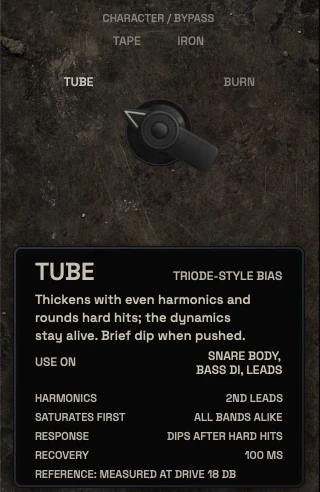
Tube is a tube-inspired harmonic character for weight and presence without fizz. Tape is a tape-inspired saturation character for density and gentle high-end softening, and it is not the full tape workflow of Rot. Iron is a transformer-inspired weight and colour character, not a licensed emulation of any specific unit. Burn is the aggressive distortion and clipping character for parallel destruction and edge.
Switch characters while listening at matched output level. The differences should be audible in the harmonic content and in how the character reacts to input level, not only in loudness.
Tube: harmonic weight and presence
Tape: saturation density, not a tape machine
Iron: transformer-inspired colour, no brand emulation
Burn: aggressive clipping and distortion
The character selector with Tube, Tape, Iron and Burn, and the card describing the selected character02 / 06
Drive, input and output
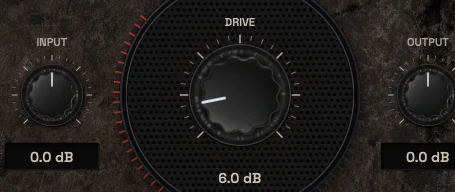
Drive is the main control and it is large because it is the control you will use most. Input level sets how hard the selected character is hit, and output level lets you compare at matched loudness. The interaction between input and drive determines how much of the character you hear, so small input changes can matter more than they look.
Start with output matched to bypass, then raise drive until the character is clearly audible, then back off until it sits in the mix. Extreme Burn settings can destroy transients; that is a creative choice, not the default target.
Drive is the primary character amount
Input sets how hard the algorithm is driven
Output enables level-matched A/B
Extreme settings are creative choices, not defaults
The large Drive control between Input and Output03 / 06
Heat display and what it means
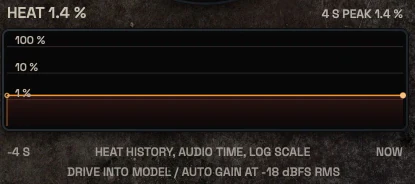
The current UI shows a Heat display and a short history. Treat it as a relative activity indicator for the selected character, not as a calibrated distortion measurement.
A meter that looks like a measurement but is not one will mislead you.
Heat is a relative activity indicator
Not a calibrated distortion measurement
The Heat display with its four-second history04 / 06
VU and level references
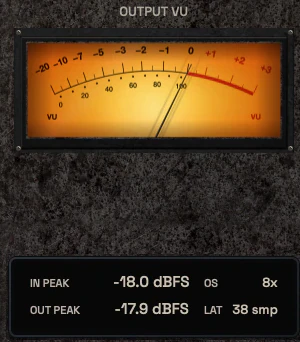
The VU meter has a defined calibration that is stated in the UI. It is a level reference, not a harmonic analyser, and it should not be confused with the Heat display. Input and output peak indicators show real signal values where the build provides them.
Use the VU to keep comparisons honest. Saturation that sounds better is often just louder, so match output level before you judge a character.
VU calibration is stated
VU is level, not harmonic content
Match level before judging character
The output VU with the input and output peak readouts05 / 06
Tone and colour balance
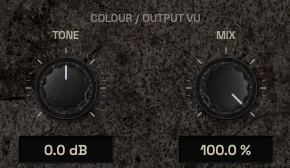
Tone shapes the balance of the generated harmonics and the character's top-end behaviour. It is not a full EQ and it should not be used to fix problems that belong earlier in the chain. Small moves are usually enough once Drive is set.
On guitars, use Tone to keep the character from adding harshness in the upper mids. On bass, use it to keep the added harmonics readable without pushing sub content. On the mix bus, keep the character subtle and check the result in mono.
Tone balances harmonics and top end
Not a substitute for corrective EQ
Small moves after Drive is set
Check mix bus use in mono
The Tone and Mix controls06 / 06
Placement, bypass and formats
Pyre is built for Windows and macOS. It is finished and in detailed testing, not on sale yet, so host and format support will be stated only when confirmed. Bypass is a real signal bypass, and A/B comparison preserves the character selection so you can compare two amounts of the same character.
Place Pyre where the character belongs in the chain. On a DI, that is usually before the amp sim or before bus compression. On a parallel drum bus, it is the whole point of the parallel path. On the mix bus, keep it last in the colour stage and before peak control.
Built for Windows and macOS
Finished and in detailed testing, not on sale yet
Bypass is real signal bypass
Place before or after processing by intent
The bypass switch
Three ways to use it
Step-by-step starting points from real heavy sessions. Every mix is different; trust your ears over any recipe.
Rhythm guitar weight without fizz
Insert Pyre on the rhythm guitar bus after the amp sim and before bus compression.
Select Iron and set output to match bypass level.
Raise Drive until the low mids gain weight, then back off until the pick attack stays intact.
Use Tone to reduce any added upper-mid harshness.
A/B at matched level and check the bus in mono before printing.
Parallel drum aggression
Create a parallel path from the drum bus and insert Pyre on it.
Select Burn and set a high Drive for obvious distortion.
Use the Tone control to keep cymbals from becoming brittle.
Blend the parallel path under the dry drum bus until the attack thickens.
Check that the parallel path does not add uncontrolled low-end build-up.
Bass DI harmonic translation
Insert Pyre on the bass DI before the amp sim or bass bus compressor.
Select Tube and match output to bypass.
Raise Drive until the bass reads on small speakers, then reduce if the sub content suffers.
Use Tone to keep the added harmonics from sounding gritty in the upper mids.
Compare the DI path with and without Pyre in the full mix, not soloed.
Before you reach for it
The mistakes we see most often with this kind of tool, and where it usually sits in a chain.
Common mistakes
Judging a character while it is louder than bypass. Match output level first.
Using Burn as a default on every source. It is an aggressive character and it will destroy transients when pushed.
Expecting Tape to behave like a full tape machine. That is Rot's job, not Pyre's.
Where it fits
On a DI or amp track, Pyre usually sits after the amp or cab and before bus compression, so the character is part of the source tone. On a parallel drum path, it is the parallel processor itself, blended under the dry bus. On a mix bus, place it after corrective EQ and before peak control, and keep the amount small enough that the character survives a mono check. These are illustrative placements, not rules for every session.
Factory presets
Shape harmonic character, weight and aggression with four distinct models. The factory library runs to dozens of presets, often more than a hundred, covering technical jobs, genres and instrument categories, sorted by category and searchable. Three of them are below.
Bass DI Harmonic Presence
Burn character blended in with Mix. The clipped layer adds upper harmonics that small speakers can play, while the dry signal keeps the low end intact.
Rhythm Guitar Low-Mid Weight
Iron character at moderate Drive for density in the low mids. Auto gain holds the level, so what changes is the weight of the tone and not how loud it is.
Drum Bus Parallel Aggression
Burn driven hard with Mix pulled well down. A heavily clipped copy sits under the dry drums and adds impact, and the dry transients stay untouched.
Preset families: Tube, Tape, Iron and Burn; Drums, Bass, Guitars, Vocals, Parallel Processing and Buses.
Why KRIG Audio
Before KRIG we spent years mixing with other makers’ plugins, and we learned what a heavy session needs from a tool. So every plugin starts with the sound: DSP written to a measured target and tested until it behaves the same way every time.
Built from years at the deskWe mixed and mastered with plugins from many makers for years, on our own records and on other people’s, and the same problems kept costing us time: gates that chatter, saturation that smears a riff, limiters that flatten the kick. Each KRIG plugin starts from one of those problems.
DSP written to a measured targetWe write our own signal processing. Before the first line of code we decide what the plugin must do to the signal: the curve it draws, the harmonics it adds, the noise it must not. The DSP is measured against that target, and when the two disagree, the code goes back.
Tested again and againSine tones, sweeps, impulses and noise at the levels people mix at. Every control swept while audio plays, to catch clicks and zipper noise. Every sample rate and buffer size a session can run at. Then real multitracks, at matched level, judged by ear. Every new build runs it all again.
Meters that tell the truthEvery meter and display is fed signals whose values we already know, and has to show exactly that. A VU reads like a VU, gain reduction reads gain reduction, and nothing on the screen moves for show, so what you see is what the plugin is doing to your track.
Presets for every jobDozens of factory presets per plugin, many with more than a hundred: technical fixes, genre starting points and instrument categories, sorted and searchable. A beginner starts from the job in front of them; an engineer gets a tested reference to build on.
Buy once, keep itEvery KRIG plugin is a one-time purchase with a perpetual licence, never a subscription. A 14-day full-feature trial is planned, so you can judge each plugin in your own sessions before you pay.
Not sure it’s the right tool?
How Pyre differs from its closest KRIG neighbours.
Rot · Rot is a full reel-to-reel tape workflow built around record level, magnetic behaviour and playback character, while Pyre's Tape character is one saturation flavour among four.
Sigil · Sigil is an eight-band parametric and dynamic EQ for surgical tone shaping, while Pyre adds harmonic character rather than correcting frequency balance.
Where Pyre stands
The DSP is finished and Pyre is in detailed testing. It goes on sale when it has passed measurement, real sessions, the interface check and listening. There are no release dates until a plugin is ready. Follow the roadmap
Research & specificationCompleted
Interface designCompleted
DSP implementationCompleted
Validation & QAIn progress
Release preparationPlanned
ReleasedPlanned
Details
What we can state today. System requirements, tested hosts and test results are published here before release.
Type
Saturation & Distortion
Status
DSP finished, in testing
Platforms
Built for Windows and macOS
Formats (planned)
VST3 for Windows and macOS, AU for macOS. No AAX
Presets
Factory library, see above
Made for
Beginners to mastering engineers
Licence (planned)
Perpetual, one-time purchase. Computers and updates confirmed when the plugins are finished
Trial (planned)
14-day full-feature trial
Pyre questions
It is not a tape machine, an amp simulator, a bitcrusher or a multi-effect degradation unit. It is a four-character saturation and distortion plugin. The Tape character is a saturation flavour, not the full reel-to-reel workflow of Rot.
Yes. The large Drive control and four clearly named characters give a clear starting point, and output level matching makes A/B comparison honest. The deeper controls are there for engineers who want them, but you can get useful results with Drive, character and output alone.
Pyre is built for Windows and macOS. It is finished and in detailed testing, not on sale yet, so host and format support will be stated only when confirmed. There are no download or purchase options yet.
Pyre gives you four distinct saturation and distortion characters for adding weight and harmonics to a source. Rot is a full reel-to-reel tape workflow built around record level, magnetic behaviour and playback character. Pyre Tape is not Rot.
Yes, with restraint. Use a subtle character and low Drive, match output to bypass, and check the result in mono. Pyre is not a mastering chain by itself, and it does not replace peak control or metering.