Gate, downward and upward expander for controlling bleed, noise and attack. Nihil is a gate, downward expander and upward expander for the messy parts of metal mixes: tom and snare bleed, amp hiss between phrases, idle bass DI noise, and palm-muted guitar gaps that never fully close. It separates the detector from the audio path, so you decide what opens the gate and how the gain moves. It is finished and in testing.
DSP finished, in testing1 of 15Built for Windows and macOS
You have a tom close-mic track where snare and hi-hat bleed sits only a few dB under the tom hits. A fast gate closes cleanly on the tom but chatters on the bleed between hits, and a slow gate lets the bleed ride through the whole bar. You want the tom to open on the hit, stay open through the natural ring, and close before the next snare backbeat without pumping or clipping the attack.
What it does
Nihil tracks a detector signal against a threshold, then applies gain to the audio path according to the selected mode. The detector can run on peak or RMS, with optional sidechain high-pass and low-pass filtering. Gate mode opens and closes hard around the threshold. Downward expansion reduces gain below the threshold by a ratio, so quiet material is pulled down proportionally rather than cut. Upward expansion lifts material above the threshold, useful for detail and ambience. Attack, hold, release and lookahead shape the envelope, and hysteresis separates the open and close thresholds so the gate does not chatter around a single point. The static transfer graph and the level history display are driven by the same values the DSP uses, so the curve shows what the audio path is doing.
What it doesn’t do
It is not a compressor. It does not reduce gain above a threshold to control peaks; that is Shackle's job.
It is not a noise-removal or restoration tool. It will not remove broadband noise from a recording, only gate or expand what is below or above the threshold.
It is not a replacement for manual editing on difficult tracks. If bleed and signal overlap in time and level, no gate will separate them cleanly.
It does not guarantee zero latency or artifact-free operation at extreme settings. Lookahead and very fast attack/release values have trade-offs you should audition.
Inside Nihil.
Every part of the real interface, explained: what it does, and why it matters in a heavy mix.
01 / 07
Threshold, ratio and hysteresis
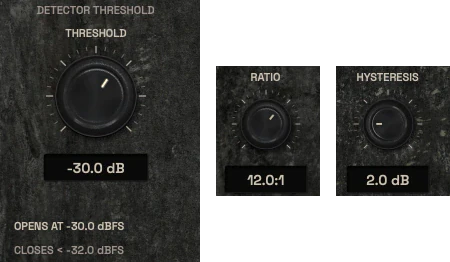
The threshold is where the detector decides the signal is open or closed. In Gate mode it is a hard decision point. In Downward mode it sets where expansion begins, and the ratio controls how steeply quiet material is pulled down. In Upward mode it sets where the lift begins.
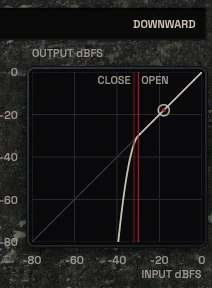
Hysteresis separates the open and close thresholds so a signal hovering around one level does not make the gate stutter. A small hysteresis is enough for clean drums; a larger one helps on sustained sources with slow decay. The static transfer graph shows the curve you are applying, with a 1:1 reference line and the current operating point.
Threshold in dBFS, ratio as a numeric ratio, hysteresis in dB.
Separate open and close thresholds are visible on the transfer graph.
Downward ratio above 1 produces a steep curve by design, not by error.
The threshold control with its open and close readouts, the ratio control and the hysteresis control02 / 07
Three modes, three curves
Gate, Downward and Upward are separate signal paths with different goals. Gate is for hard cleanup: closing bleed between hits. Downward expansion is for gentler control: pulling down room and bleed proportionally so the result sounds natural rather than chopped. Upward expansion lifts low-level detail, which is useful on ambience and room mics when you want more of what is already there.
The transfer graph shows what each mode does. If the curve looks steep, the audio will sound steep. Use the graph together with the level history to see where your signal sits relative to the threshold.
Gate, Downward and Upward are distinct modes, not presets of one curve.
Knee softens the transition around the threshold in Downward and Upward modes.
Range limits the maximum gain reduction or boost the mode can apply.
The mode selector set to Downward above the static transfer curve, with the 1:1 reference and the operating point03 / 07
Level history and open/close state
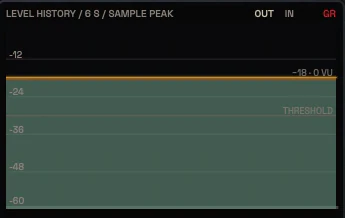
The rolling level history shows input and output level over time, plus gain reduction, with the open and close thresholds drawn as lines. This is where you see whether the gate is actually closing between hits or riding the bleed. If the input trace never drops below the close threshold, the gate cannot close, and no amount of attack or release tuning will fix that.
The state readout shows OPEN or CLOSED in real time. When the state flickers, hysteresis is usually too small or the threshold sits inside the noise floor. The history display is driven by real signal, not a timer animation.
Input, output and gain reduction are shown on the same time axis.
Open and close thresholds are drawn as separate lines.
The six-second level history with the threshold line04 / 07
Meters and spectrum
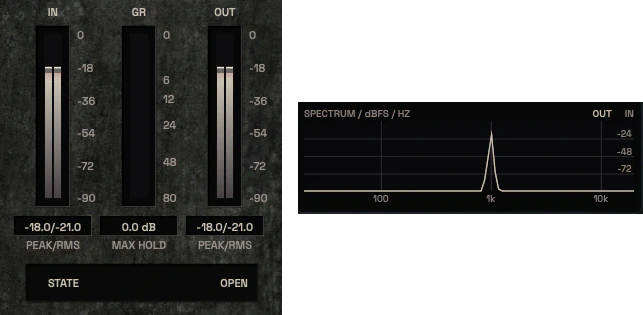
The IN, GR and OUT meters show level and gain reduction with defined units and ballistics. The spectrum view is a separate FFT with a real Hz axis, useful for finding where bleed sits relative to the source so you can set the sidechain high-pass and low-pass filters sensibly.
The meters and the spectrum are different instruments and are not merged into one display. Each one has a defined tap point and unit.
IN, GR and OUT meters with dB units and defined ballistics.
Spectrum is a separate FFT with a real frequency axis.
Sidechain filter settings are visible against the spectrum.
The IN, GR and OUT meters with the state readout, and the spectrum view05 / 07
Attack, hold, release and lookahead
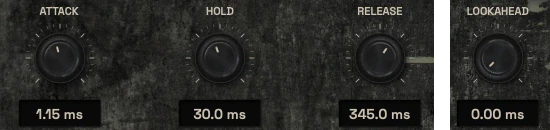
Attack sets how fast the gate opens once the detector crosses the threshold. Hold keeps it open for a set time after the signal drops, which is what stops a tom ring from being chopped mid-decay. Release sets how fast it closes after hold expires. Lookahead lets the detector see the signal slightly before it reaches the audio path, so the gate can be open by the time the transient arrives.
These four controls interact. A long hold with a fast release sounds different from a short hold with a slow release, even if the total open time is similar. Audition on the actual source, not on a test tone.
Attack, hold and release are in milliseconds with real units.
Lookahead shifts detector timing relative to the audio path.
Hold is the main control for preserving natural decay on drums.
Attack, hold and release controls, and the lookahead control06 / 07
Detector source and sidechain filters
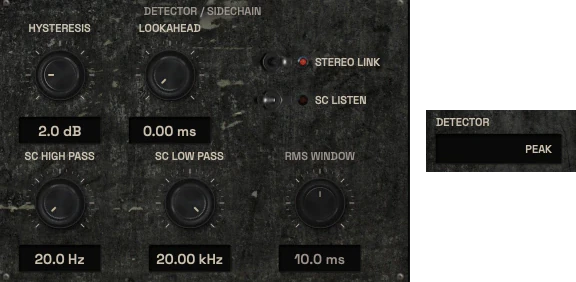
The detector can run on peak or RMS, and the sidechain high-pass and low-pass filters let you decide which part of the signal the detector hears. On a tom track, a high-pass around the tom's fundamental range can stop low-frequency bleed from opening the gate. On a guitar track, a low-pass can stop pick noise from triggering the detector.
SC Listen lets you hear the filtered detector signal so you can set the filters by ear. External sidechain is only present if the build and host support it; where it is not available, the control is not shown as if it were.
Peak and RMS detection modes with different response character.
Sidechain high-pass and low-pass shape what the detector hears.
SC Listen auditions the detector signal, not the processed output.
The detector and sidechain panel: hysteresis, lookahead, sidechain high-pass and low-pass, RMS window, and the peak or RMS detector switch07 / 07
Output trim, stereo link and bypass
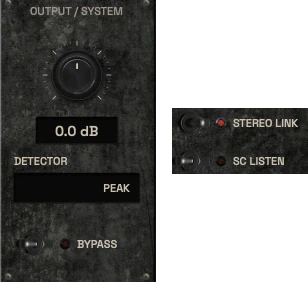
Output trim compensates for level changes introduced by gating or expansion so you can compare fairly against the bypassed signal. Stereo link keeps left and right channels gated together, which matters on stereo drum overheads and room mics where independent gating would shift the stereo image.
Bypass is a real signal bypass, not a hidden branch. When you compare, match levels first. A gate that sounds better is often just a gate that is louder.
Output trim in dB for level-matched comparison.
Stereo link keeps left and right gating decisions together.
Bypass removes the processing from the signal path entirely.
The output panel with output trim and bypass, and the stereo link and sidechain listen switches
Three ways to use it
Step-by-step starting points from real heavy sessions. Every mix is different; trust your ears over any recipe.
Tom bleed cleanup with natural ring
Insert Nihil on the tom close-mic track and set mode to Gate.
Raise the threshold until the gate closes on bleed between hits but still opens on every tom hit.
Increase hold until the natural tom decay is preserved without being chopped.
Set attack fast enough that the transient is not softened, and release short enough that the gate closes before the next snare backbeat.
Add a small hysteresis value if the state readout flickers, then level-match with output trim and compare against bypass.
Palm-muted guitar gaps and amp hiss
Insert Nihil on the guitar bus or the amp mic track and set mode to Downward for gentler control.
Set the threshold just below the quietest sustained palm-mute so the gaps between phrases are pulled down, not cut.
Use a moderate ratio and a soft knee so the transition into expansion is not audible as a step.
Set attack and release slow enough that the expansion follows the phrase, not individual pick strokes.
Use sidechain low-pass to keep pick noise out of the detector, then compare level-matched against bypass.
Upward detail lift on room mics
Insert Nihil on the room mic pair and set mode to Upward.
Set the threshold so only the quieter room detail above the threshold is lifted, not the loud hits.
Use a modest range so the lift stays subtle and does not change the balance of the kit.
Enable stereo link so left and right room mics move together and the stereo image stays stable.
Audition against bypass at matched level and check that the lift does not exaggerate cymbal wash or bleed.
Before you reach for it
The mistakes we see most often with this kind of tool, and where it usually sits in a chain.
Common mistakes
Setting the threshold inside the noise floor so the gate never fully closes, then compensating with extreme attack and release values.
Using Gate mode where Downward expansion would sound more natural, especially on sustained sources like guitars and room mics.
Comparing gated and bypassed signal without level matching, which makes the louder version sound better regardless of the processing.
Where it fits
On a snare or tom close-mic, Nihil usually sits first to clean bleed before tone shaping with Sigil and optional colour with Pyre. On a guitar bus it can sit before Sigil to close gaps and reduce amp hiss, or after Pyre if you want the expander to react to the coloured signal. On a bass DI it can sit before Shackle to remove idle noise without affecting the note envelope. These are starting points, not fixed rules; the right position depends on what you want the detector to hear.
Factory presets
Remove unwanted noise and bleed while preserving the performance. The factory library runs to dozens of presets, often more than a hundred, covering technical jobs, genres and instrument categories, sorted by category and searchable. Three of them are below.
Kick Mic Bleed Control
Gate with the sidechain low-pass closed down, so only the kick’s low end can open it. A fast attack and short hold let each double-kick hit through, and snare and cymbal spill between hits stays shut.
Snare Ghost Note Preserve
Downward expander at a low ratio instead of a gate. The threshold sits just under the ghost notes, so they come through while spill between hits drops by a few dB.
Fast Tremolo Guitar Gate
Gate with lookahead, so the detector sees each note early and the pick attack is never cut. Fast release closes on amp noise in the gaps, and the open and close thresholds sit apart to stop chatter.
Preset families: Kick, Snare Top, Snare Bottom, Toms, Guitars, Bass, Vocals, Drums and General Cleanup, with distinct Gate, Downward and Upward Expander applications.
Why KRIG Audio
Before KRIG we spent years mixing with other makers’ plugins, and we learned what a heavy session needs from a tool. So every plugin starts with the sound: DSP written to a measured target and tested until it behaves the same way every time.
Built from years at the deskWe mixed and mastered with plugins from many makers for years, on our own records and on other people’s, and the same problems kept costing us time: gates that chatter, saturation that smears a riff, limiters that flatten the kick. Each KRIG plugin starts from one of those problems.
DSP written to a measured targetWe write our own signal processing. Before the first line of code we decide what the plugin must do to the signal: the curve it draws, the harmonics it adds, the noise it must not. The DSP is measured against that target, and when the two disagree, the code goes back.
Tested again and againSine tones, sweeps, impulses and noise at the levels people mix at. Every control swept while audio plays, to catch clicks and zipper noise. Every sample rate and buffer size a session can run at. Then real multitracks, at matched level, judged by ear. Every new build runs it all again.
Meters that tell the truthEvery meter and display is fed signals whose values we already know, and has to show exactly that. A VU reads like a VU, gain reduction reads gain reduction, and nothing on the screen moves for show, so what you see is what the plugin is doing to your track.
Presets for every jobDozens of factory presets per plugin, many with more than a hundred: technical fixes, genre starting points and instrument categories, sorted and searchable. A beginner starts from the job in front of them; an engineer gets a tested reference to build on.
Buy once, keep itEvery KRIG plugin is a one-time purchase with a perpetual licence, never a subscription. A 14-day full-feature trial is planned, so you can judge each plugin in your own sessions before you pay.
Not sure it’s the right tool?
How Nihil differs from its closest KRIG neighbours.
Shackle · Shackle is a stereo compressor that reduces gain above a threshold to control peaks and density; Nihil gates and expands below or above a threshold to control bleed, noise and quiet detail.
Thrall · Thrall rides long-term average level slowly toward a target; Nihil reacts to individual events at the threshold with attack, hold and release, and does not level phrases over time.
Flay · Flay shapes the balance between transient onset and sustain body; Nihil decides whether the signal passes at all based on a threshold, and does not reshape the internal envelope of the hit.
Where Nihil stands
The DSP is finished and Nihil is in detailed testing. It goes on sale when it has passed measurement, real sessions, the interface check and listening. There are no release dates until a plugin is ready. Follow the roadmap
Research & specificationCompleted
Interface designCompleted
DSP implementationCompleted
Validation & QAIn progress
Release preparationPlanned
ReleasedPlanned
Details
What we can state today. System requirements, tested hosts and test results are published here before release.
Type
Gate / Expander
Status
DSP finished, in testing
Platforms
Built for Windows and macOS
Formats (planned)
VST3 for Windows and macOS, AU for macOS. No AAX
Presets
Factory library, see above
Made for
Beginners to mastering engineers
Licence (planned)
Perpetual, one-time purchase. Computers and updates confirmed when the plugins are finished
Trial (planned)
14-day full-feature trial
Nihil questions
It is not a compressor, a noise-removal tool, or a replacement for manual editing. It gates and expands based on a threshold; it does not separate signal from bleed that overlaps in time and level, and it does not reduce peaks above a threshold the way Shackle does.
Yes. The default starting points and the transfer graph give you a clear view of what the gate is doing, and the level history shows whether it is actually closing between hits. The deeper controls (hysteresis, sidechain filters, lookahead, peak versus RMS detection) are there for engineers who need them, but you do not have to touch them to get a usable result.
KRIG plugins are being built for Windows and macOS. Nihil is finished and in detailed testing, not on sale yet, so host and format support will be confirmed as part of the release process.
Shackle compresses: it reduces gain above a threshold to control peaks and density. Nihil gates and expands: it closes or pulls down material below a threshold, or lifts material above it, to control bleed, noise and quiet detail. They solve different problems and often sit in the same chain at different points.
No. It can close the gate between hits and pull down quiet material, but where bleed and source overlap in time and level, no gate can separate them cleanly. In those cases, manual editing or a different mic technique is the honest answer.