Tame moving resonances inside a single signal before they dominate the mix. Exorcise is a dynamic resonance suppressor designed for one job: finding the resonant peaks that move around inside a single signal and reducing them only when they actually cause trouble. It is built for gain-heavy guitars, cymbal wash, nasal harsh vocals, snare ring and note-dependent bass honk. Its interface is built as a working prototype; the audio processing is not implemented yet, so this page describes how it will work.
Interface prototype, no DSP yet7 of 15Built for Windows and macOS
You have a rhythm guitar take that sounds right on the palm-muted chugs but turns into an ice-pick spike on certain sustained chords, and a fixed EQ cut at that frequency hollows out the good parts of the performance. The same thing happens on a snare that rings only on the harder hits, or a harsh vocal that goes nasal on one vowel and clean on the next. You need reduction that follows the performance, not a static curve that is wrong half the time.
What it does
Exorcise is designed to detect time-varying resonant energy peaks inside one signal and apply targeted, conditional dynamic suppression to those peaks, leaving the rest of the signal alone. It sits between a static EQ and a full spectral processor: it does not give you eight manual bands to place, and it does not listen to a second source. The detector, weighting and limits are open DSP decisions, so every control here describes how it will work rather than a finished feature.
What it doesn’t do
Not a manual parametric EQ: you do not place bands by hand, it works from detected resonant peaks.
Not a cross-signal sidechain tool: it does not duck one track against another, that is Hollow's job.
Not a multiband compressor: it does not split the signal into fixed frequency zones with per-band ratio and attack.
Not a de-esser or a noise remover: it targets resonances, not sibilance or broadband noise.
Inside the Exorcise prototype.
The interface is built and every control can be worked. The audio processing is not implemented yet, so the displays show labelled demo data, and controls can still change.
01 / 04
What Exorcise is for
Exorcise targets the resonances that move. A fixed EQ cut is the right tool when a problem lives at one frequency all the time. When the problem only appears on certain notes, certain hits or certain vowels, a static cut removes good tone during the passages that were fine. Exorcise is designed to reduce energy only where and when a resonant peak is actually present.
The intended sources are gain-heavy rhythm and lead guitars, cymbals and overheads, harsh and clean vocals, snare and toms, bass, and room mics. It is a corrective tool for dense mixes, not a tone shaper and not a creative effect. If you want broad tonal moves, use Sigil. If you want one track to make room for another, use Hollow.
Designed for resonances that change over the course of a performance.
Intended for guitars, cymbals, vocals, drums, bass and rooms.
Corrective by design, not a tone shaper or creative effect.
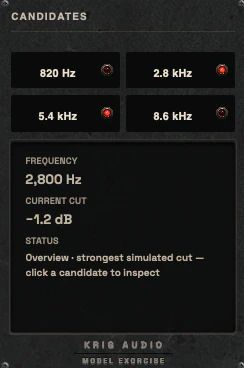
The candidate list with four detected resonances and the inspector for the selected one02 / 04
Controls
The control set is Sensitivity, Depth or Maximum Reduction, Selectivity, Frequency Range or Focus, Speed (attack and release), Mix, Output and Bypass, plus Listen or Audition and a Freeze display option. Sensitivity sets how readily a peak is treated, Depth caps how much reduction is allowed, and Selectivity controls how narrow the detected peaks are. Frequency Range or Focus limits where the detector looks, which matters on guitars where the problem is usually in the upper mids.
Transient protection is planned only if it can be technically justified, and there is no hardcoded bank of a thousand automatic bands. Every range, curve and time constant is an open DSP decision. Nothing in this list is implemented yet.
Sensitivity, Depth and Selectivity are the core controls.
Frequency Focus limits the detector to the range that matters.
The control panels: suppression, frequency focus, response, output and monitor03 / 04
Display and metering
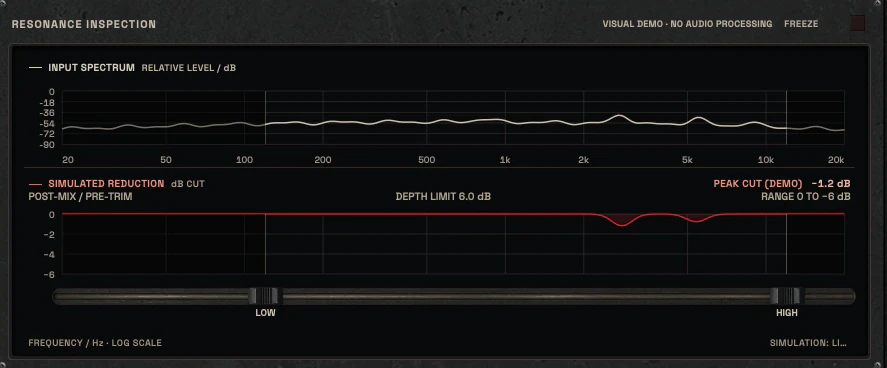
The display separates three things that must never be faked into one: the input spectrum, the detected resonances, and the actual amount of reduction applied. They are shown as distinct layers over a real Hz and kHz axis, with a time activity graph and a visible focus selection. The display makes it obvious what was detected, what was selected and what was removed.
The industrial housing carries the wear; the scales, axes and FFT data stay clean and readable.
Input spectrum, detected peaks and applied reduction are separate layers.
Frequency axis in Hz and kHz, with a time activity graph.
The resonance inspection display: input spectrum above, simulated reduction below, and the focus range04 / 04
Where it fits in a chain
A typical placement is after the tone shaping and before compression or limiting, so the detector sees the signal you actually intend to keep. On a guitar bus that means Sigil for broad tone, then Exorcise for the moving harshness, then Pyre or Rot if you want colour, then Legion if stereo width is the issue. On a vocal it usually sits after long-term level control and before the compressor.
Order is a production suggestion, not a rule. Exorcise can also run after compression if the compressor is what exposes the resonance, but then the detector reacts to a compressed signal and the result changes. Try both and listen.
Commonly placed after tone shaping and before compression.
On guitars, pair with Sigil for tone and Legion for width.
Placement after compression changes what the detector sees.
Three ways to use it
Step-by-step starting points from real heavy sessions. Every mix is different; trust your ears over any recipe.
High-gain guitar ice-pick control
Insert Exorcise on the rhythm guitar bus after your tone EQ.
Set Frequency Focus to the upper-mid range where the spike lives.
Raise Sensitivity until the moving peaks are detected on the harder chords.
Set Depth conservatively and use Listen to confirm you are catching resonance, not pick attack.
A/B level-matched against bypass and check that sustained chords keep their body.
Snare ring that only appears on hard hits
Insert Exorcise on the snare close mic or the snare bus.
Focus the detector on the ring frequency range, not the whole spectrum.
Set Selectivity narrow so only the ringing peak is treated.
Tune Speed so reduction releases before the next hit and does not smear the tail.
Compare ghost notes and soft hits to confirm they are untouched.
Harsh vocal nasal reduction
Place Exorcise after long-term level control and before the main compressor.
Focus on the nasal upper-mid range and set Sensitivity so only the offending vowels trigger.
Keep Depth modest and check intelligibility on the whole phrase, not one word.
Use Mix to blend reduction rather than removing the resonance completely.
Verify on a level-matched A/B that the vocal does not lose presence.
Before you reach for it
The mistakes we see most often with this kind of tool.
Common mistakes
Setting Depth too high and removing the resonance completely, which flattens the character of the source.
Leaving Frequency Focus wide open so the detector chases content you never wanted to touch.
Judging the result without a level-matched A/B, so quieter reduction is mistaken for better tone.
Factory presets
Reduce problem resonances when they become excessive, without removing useful tone. The factory library runs to dozens of presets, often more than a hundred, covering technical jobs, genres and instrument categories, sorted by category and searchable. Three of them are below.
Harsh Rhythm Guitar Control
Frequency Focus limited to the upper mids. Selectivity is high, so Exorcise cuts narrowly at each resonance as it moves with the riff and leaves the tone around it alone.
Snare Ring Management
Frequency Focus set on the area where the drum rings, with enough Depth to pull the ring down after the hit. The crack and body of the snare are outside the cut.
Dense Mix Resonance Cleanup
Wide Frequency Focus, low Depth and moderate Sensitivity, so it trims several peaks a little at a time. Made for buses, where large cuts would be audible.
Before KRIG we spent years mixing with other makers’ plugins, and we learned what a heavy session needs from a tool. So every plugin starts with the sound: DSP written to a measured target and tested until it behaves the same way every time.
Built from years at the deskWe mixed and mastered with plugins from many makers for years, on our own records and on other people’s, and the same problems kept costing us time: gates that chatter, saturation that smears a riff, limiters that flatten the kick. Each KRIG plugin starts from one of those problems.
DSP written to a measured targetWe write our own signal processing. Before the first line of code we decide what the plugin must do to the signal: the curve it draws, the harmonics it adds, the noise it must not. The DSP is measured against that target, and when the two disagree, the code goes back.
Tested again and againSine tones, sweeps, impulses and noise at the levels people mix at. Every control swept while audio plays, to catch clicks and zipper noise. Every sample rate and buffer size a session can run at. Then real multitracks, at matched level, judged by ear. Every new build runs it all again.
Meters that tell the truthEvery meter and display is fed signals whose values we already know, and has to show exactly that. A VU reads like a VU, gain reduction reads gain reduction, and nothing on the screen moves for show, so what you see is what the plugin is doing to your track.
Presets for every jobDozens of factory presets per plugin, many with more than a hundred: technical fixes, genre starting points and instrument categories, sorted and searchable. A beginner starts from the job in front of them; an engineer gets a tested reference to build on.
Buy once, keep itEvery KRIG plugin is a one-time purchase with a perpetual licence, never a subscription. A 14-day full-feature trial is planned, so you can judge each plugin in your own sessions before you pay.
Not sure it’s the right tool?
How Exorcise differs from its closest KRIG neighbours.
Sigil · Sigil is a manual eight-band parametric and dynamic EQ where you place every band, while Exorcise works from detected resonances inside one signal.
Hollow · Hollow ducks one signal against a second external key source, while Exorcise only looks inside its own input.
Schism · Schism splits the signal into fixed frequency zones with per-band dynamics, while Exorcise targets individual moving resonant peaks.
Where Exorcise stands
The interface is built and every control can be worked; the audio processing is not implemented yet. Interface prototype: DSP not yet implemented. There are no release dates until a plugin is ready. Follow the roadmap
Research & specificationCompleted
Interface designCompleted
DSP implementationPlanned
Validation & QAPlanned
Release preparationPlanned
ReleasedPlanned
Details
What we can state today. System requirements, tested hosts and test results are published here before release.
Type
Dynamic Resonance Suppression
Status
Interface prototype: DSP not yet implemented
Platforms
Built for Windows and macOS
Formats (planned)
VST3 for Windows and macOS, AU for macOS. No AAX
Presets
Factory library, see above
Made for
Beginners to mastering engineers
Licence (planned)
Perpetual, one-time purchase. Computers and updates confirmed when the plugins are finished
Trial (planned)
14-day full-feature trial
Exorcise questions
It is not a manual EQ, not a cross-signal sidechain tool, not a multiband compressor and not a de-esser or noise remover.
Yes. The design gives clear defaults and a small set of controls, with Listen and a visible detected-versus-removed display so you can hear and see what is happening. Deep control stays available for engineers who want it.
Details come with the release.
Sigil is a manual eight-band parametric and dynamic EQ where you choose frequency, gain and Q for every band. Exorcise is designed to find moving resonances inside one signal and reduce them conditionally, without you placing bands by hand.
Hollow uses a second external key signal to duck specific frequency content in the main signal, which is a cross-source conflict tool. Exorcise only analyses its own input and never needs a sidechain.