Stereo compressor built to preserve or reshape punch, not just reduce level. Shackle is a stereo compressor built around one question: does the hit still hit after gain reduction? It is made for drum buses, bass, guitars and mix buses where attack and groove matter as much as level control. The DSP is finished and validated in host and AU tests; final listening sign-off is still to come, and it is not on sale yet.
DSP finished, in testing6 of 15Built for Windows and macOS
You have a double-kick drum bus that needs to sit together, but every time you push the compressor the kick loses its front edge and the snare starts to duck under the guitars. A slower attack brings the punch back but the low end starts to pump with the kick pattern, and the release you picked for the snare is wrong for the tom fills. You end up automating around your own compressor instead of mixing.
What it does
Shackle is a stereo compressor with three detector modes. Clean is linear with a programme-dependent release, Punch adds an S-shaped onset so the front of a hit gets through before the compressor closes, and Glue recovers on fixed RC-style release positions for bus work. INPUT moves the detector, never the audio, and the threshold sits at the 0 VU reference, so the meter tells you directly how far into compression you are driving it. OUTPUT is a separate trim after the mix control, which keeps how hard the compressor works and how loud it comes out as two independent decisions.
What it doesn’t do
Not a gate, expander or level rider: it does not open and close on silence or ride long-term vocal level.
Not a multiband compressor: frequency-split dynamics belong to Schism.
Not a transient shaper: direct attack/sustain envelope control belongs to Flay.
Not a mastering-grade limiter or peak catcher: that is Entomb.
Inside Shackle.
Every part of the real interface, explained: what it does, and why it matters in a heavy mix.
01 / 04
Ratio, mode and timing
RATIO is stepped from 1.5:1 to 20:1, with 4:1 as the default, so a setting can be repeated exactly from one session to the next. MODE changes the detector and the recovery law rather than recalling a preset of the same compressor: Clean for plain level control, Punch when the attack has to survive, Glue for buses that need to move together.
ATTACK runs from 0.1 to 100 ms and RELEASE from 20 to 2000 ms; in Glue mode release is set by position (0.1, 0.3, 0.6 or 1.2 s) or by AUTO. KNEE softens the entry into compression, RANGE caps how much gain reduction the loudest hits can receive, and MIX blends the compressed signal with the dry one for parallel compression inside the plugin.
Stepped ratio from 1.5:1 to 20:1
Clean, Punch and Glue change the detector, not just the settings
Range caps gain reduction; Mix gives parallel compression
The Ratio and Mode switches and the Attack, Release, Knee, Range and Mix controls02 / 04
Detector sensitivity and output trim
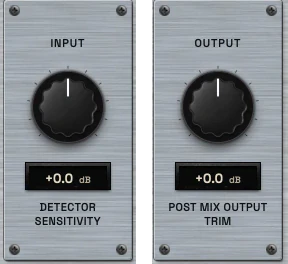
INPUT runs from -24 to +24 dB and only moves the detector. Turning it up pushes more of the signal above the threshold and increases gain reduction, while the level passing through the plugin stays where it was. OUTPUT, over the same range, is a trim applied after MIX, so set the blend first and the level last.
Neither control is a make-up gain tied to the ratio. LEVEL MATCH sets the output so that a comparison with BYPASS is about the compression, not about one side being louder.
INPUT drives the detector, never the audio
OUTPUT is a post-mix trim
LEVEL MATCH keeps the bypass comparison fair
Input, labelled detector sensitivity, and Output, the post-mix output trim03 / 04
Sidechain and stereo
Compression only sounds right when the detector listens to the right thing. The sidechain high-pass (up to 400 Hz) keeps sub energy from pushing a drum bus around, and the low-pass keeps cymbals or fizz from driving a bass compressor. SIDECHAIN LISTEN lets you hear exactly what the detector hears, and the external sidechain input lets another track drive the compression.
STEREO LINK is on by default, so both channels compress together and the image does not lean towards the louder side. AUTO RELEASE hands release timing to the programme when one fixed value cannot suit every hit.
Sidechain filters shape the detector, not the audio
Listen and external sidechain for checking and keying
Stereo link on by default
The sidechain panel with the high-pass and low-pass filters, external sidechain and listen, and the stereo link switch04 / 04
Two meters and an analysis view
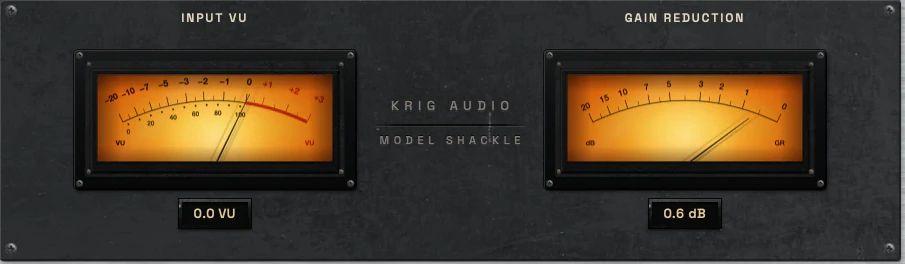
The input meter is a true VU instrument: rectified average, 300 ms ballistics, calibrated so a -18 dBFS sine reads 0 VU, which is also the compressor threshold. Beside it the gain reduction needle reads positive dB of reduction with 0 dB at the right stop and 40/230 ms ballistics, so it shows the shape of the compression rather than chasing every sample.
A display switch replaces the meters with the analysis view, which plots detector level and gain reduction over time on the standard level scale: green below -18 dBFS, yellow at the reference, red above. Where the needle shows the moment, the history shows whether gain reduction is steady or pumping across a phrase.
Input VU calibrated to the threshold
Gain reduction in positive dB, 0 dB at the right stop
Analysis view with level and gain reduction history
The input VU and the gain reduction meter
Three ways to use it
Step-by-step starting points from real heavy sessions. Every mix is different; trust your ears over any recipe.
Kick: punch preserved
Choose PUNCH mode at 4:1.
Start with a 30 ms attack and a 90 ms release, knee 4 and range 10.
Raise INPUT until the gain reduction needle moves on every kick.
Check that the first part of the kick still comes through before the body is controlled.
Turn on LEVEL MATCH and compare with BYPASS.
Kick: tight low end
Choose CLEAN mode at 3:1.
Set a 10 ms attack and a 140 ms release, knee 6 and range 6.
Set the sidechain high-pass to 40 Hz so the sub does not drive the detector.
Raise INPUT until the resonant tail settles without pumping.
Trim OUTPUT last.
Kick: even double-foot hits
Choose CLEAN mode at 4:1.
Use a fast 3 ms attack and a 45 ms release, knee 3 and range 8.
Raise INPUT until the louder hits come down to the level of the quieter ones.
Watch the analysis view to confirm gain reduction stays steady across a fast passage.
Blend with MIX if the pattern starts to sound flattened.
Before you reach for it
The mistakes we see most often with this kind of tool, and where it usually sits in a chain.
Common mistakes
Using INPUT as a level control. It moves the detector only; use OUTPUT for level.
Setting OUTPUT before MIX. OUTPUT is a post-mix trim, so set the blend first, then trim.
Leaving SIDECHAIN LISTEN on and judging the detector signal as if it were the processed audio.
Where it fits
Illustratively, Shackle sits after corrective tone work and before spatial effects: on a drum bus after bleed control and EQ, on a bass after DI/amp blend and tonal shaping, on a vocal after resonance control and before reverb and delay. On a mix bus it would sit late, after tonal moves and before peak control. These positions are production suggestions, not rules, and the right order depends on what the source actually needs.
Factory presets
Control dynamics without automatically destroying punch or musical movement. The factory library runs to dozens of presets, often more than a hundred, covering technical jobs, genres and instrument categories, sorted by category and searchable. Three of them are below.
Kick Punch Preserve
Punch mode at 4:1 with a 30 ms attack and 90 ms release, knee 4 and range 10. The first attack of the kick gets through while the body is held under control.
Kick Tight Low-End Control
Clean mode at 3:1, 10 ms attack and 140 ms release, with the sidechain high-pass at 40 Hz. It steadies a resonant low tail without pumping.
Kick Fast Pedal Evenness
Clean mode at 4:1 with a fast 3 ms attack and 45 ms release, knee 3 and range 8, so repeated double-foot hits come out at the same level.
Preset families: Technical / Utility, Drums / Kick, Drums / Snare, Drums / Toms & Percussion, Drums / Rooms & Bus, Bass, Guitars, Vocals, Mix / Buses & Utility and Mix / Master. Each factory preset is measured on real material aligned to -18 dBFS RMS for its intended gain reduction and a level-matched output.
Why KRIG Audio
Before KRIG we spent years mixing with other makers’ plugins, and we learned what a heavy session needs from a tool. So every plugin starts with the sound: DSP written to a measured target and tested until it behaves the same way every time.
Built from years at the deskWe mixed and mastered with plugins from many makers for years, on our own records and on other people’s, and the same problems kept costing us time: gates that chatter, saturation that smears a riff, limiters that flatten the kick. Each KRIG plugin starts from one of those problems.
DSP written to a measured targetWe write our own signal processing. Before the first line of code we decide what the plugin must do to the signal: the curve it draws, the harmonics it adds, the noise it must not. The DSP is measured against that target, and when the two disagree, the code goes back.
Tested again and againSine tones, sweeps, impulses and noise at the levels people mix at. Every control swept while audio plays, to catch clicks and zipper noise. Every sample rate and buffer size a session can run at. Then real multitracks, at matched level, judged by ear. Every new build runs it all again.
Meters that tell the truthEvery meter and display is fed signals whose values we already know, and has to show exactly that. A VU reads like a VU, gain reduction reads gain reduction, and nothing on the screen moves for show, so what you see is what the plugin is doing to your track.
Presets for every jobDozens of factory presets per plugin, many with more than a hundred: technical fixes, genre starting points and instrument categories, sorted and searchable. A beginner starts from the job in front of them; an engineer gets a tested reference to build on.
Buy once, keep itEvery KRIG plugin is a one-time purchase with a perpetual licence, never a subscription. A 14-day full-feature trial is planned, so you can judge each plugin in your own sessions before you pay.
Not sure it’s the right tool?
How Shackle differs from its closest KRIG neighbours.
Nihil · Nihil gates and expands to control bleed and silence; Shackle compresses continuous level and punch.
Thrall · Thrall rides long-term average level slowly; Shackle shapes transient and groove within the performance.
Schism · Schism splits the signal into frequency bands for per-band dynamics; Shackle compresses the full stereo signal.
Where Shackle stands
The DSP is finished and Shackle is in detailed testing. It goes on sale when it has passed measurement, real sessions, the interface check and listening. There are no release dates until a plugin is ready. Follow the roadmap
Research & specificationCompleted
Interface designCompleted
DSP implementationCompleted
Validation & QAIn progress
Release preparationPlanned
ReleasedPlanned
Details
What we can state today. System requirements, tested hosts and test results are published here before release.
Type
Stereo Compressor
Status
DSP finished, in testing
Platforms
Built for Windows and macOS
Formats (planned)
VST3 for Windows and macOS, AU for macOS. No AAX
Presets
Factory library, see above
Made for
Beginners to mastering engineers
Licence (planned)
Perpetual, one-time purchase. Computers and updates confirmed when the plugins are finished
Trial (planned)
14-day full-feature trial
Shackle questions
It is not a gate, expander, level rider, multiband compressor, transient shaper or limiter. Those jobs belong to Nihil, Thrall, Schism, Flay and Entomb respectively. Shackle is a stereo compressor focused on punch and level control.
Yes. The stepped ratio, three clearly different modes and a VU meter calibrated to the threshold give a clear starting point, and the Init preset tells you what to do first: raise INPUT until the needle moves. The sidechain filters, external sidechain and range are there when you need them.
Yes. Shackle is built as VST3 for Windows and macOS and AU for macOS. Settings, A/B slots and window size are recalled with the session.
Schism is a multiband dynamics processor that splits the signal into frequency zones and compresses each band separately. Shackle compresses the full stereo signal with one detector and one gain-reduction stage. If the problem is low-end pumping while the guitars stay put, that is Schism territory. If the problem is that the whole bus loses punch, that is Shackle.
Not yet. The factory library is built and measured, but nothing is on sale until Shackle has passed final listening.