Clipper and limiter for peak shaping, headroom protection and final level control. Entomb is a peak-control plugin with three signal paths: clipper only, limiter only, and clip into limit. It is made for drum transients, bus peaks and final level decisions where you need to hear exactly what each stage is doing. Entomb is finished and in testing.
DSP finished, in testing5 of 15Built for Windows and macOS
You have a snare and kick print that sounds right in the room but eats 6 dB of headroom before the drum bus even hits the mix. Clipping shaves the spikes but changes the attack; limiting catches what is left but can soften the punch you wanted. Most sessions need both, in a known order, with separate reduction readouts so you can tell which stage is working and which one is just making the mix louder.
What it does
Entomb provides a clipper stage with clip threshold and knee, a limiter stage with ceiling and release, and a routing control that places either stage alone or the clipper before the limiter. The inactive branch is bypassed rather than hidden. Oversampling and a 4x detector are part of the design, and the ceiling is sample peak, not true peak. The plugin shows clip and limiter reduction separately so you can judge the contribution of each stage.
What it doesn’t do
It is not a true-peak limiter and does not guarantee a true-peak ceiling.
It is not a compressor, gain rider or metering suite.
It does not replace manual clip-gain editing or artistic volume automation.
It does not guarantee broadcast loudness compliance.
Inside Entomb.
Every part of the real interface, explained: what it does, and why it matters in a heavy mix.
01 / 04
Input, output and gain staging
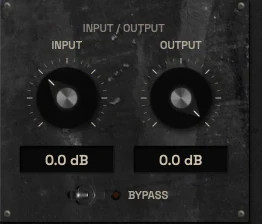
Input and Output set the level going into and coming out of the active path. Because clipping and limiting both depend on how hard the signal hits the stage, input gain is a sound-design control, not just a utility. The output trim lets you compare settings without being fooled by level changes.
Keep an eye on the IN and OUT peak displays while you move Input. If the clipper is doing all the work and the limiter shows almost no reduction, the balance between the two stages is probably wrong for the source. The goal is a repeatable gain structure you can recall, not a one-time lucky setting.
Input drives both the clipper and the limiter depending on the selected path.
Output trim supports level-matched comparison between settings.
IN and OUT peak displays show the level at each end of the chain.
The input and output controls with bypass02 / 04
Clipper stage
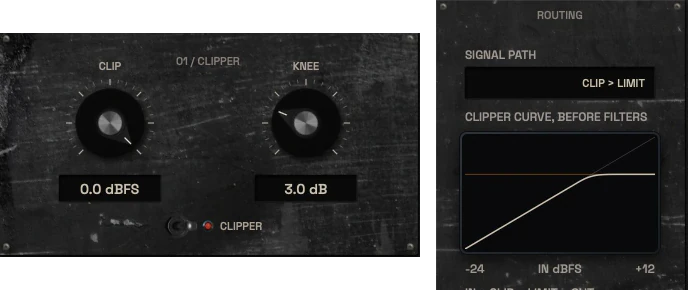
The clipper shaves peaks at the Clip threshold. Knee controls how gradually the clipper moves from clean to clipped, which changes how obvious the distortion is on transient-heavy material. A hard knee is more aggressive; a softer knee spreads the change over a wider range.
The clipper is useful on individual drum hits, bass peaks and bus material where you want to remove short overs without waiting for a limiter release. It is not a saturator: the goal is peak control, and the character comes from how much and how hard you clip.
Clip threshold sets where peak shaving begins.
Knee shapes the transition into clipping.
Clipper enable and path selection determine whether the stage is active.
The clipper panel with Clip and Knee, and the clipper curve03 / 04
Limiter stage
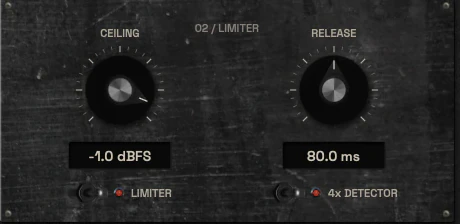
The limiter catches peaks that reach the Ceiling and uses Release to recover after reduction. It is the second stage in the clip-to-limit path and can also run alone. Ceiling is a sample-peak value; the detector is designed to reduce intersample peaks, but this is not a true-peak guarantee.
Use the limiter for the peaks the clipper did not catch, or for material where clipping is the wrong tool. Watch the limiter reduction display separately from the clipper display so you know which stage is responsible for the level change you hear.
Ceiling sets the sample-peak target for the limiter stage.
Release controls recovery after gain reduction.
Limiter reduction is displayed separately from clipper reduction.
The limiter panel with Ceiling, Release and the 4x detector switch04 / 04
Peak history and reduction displays
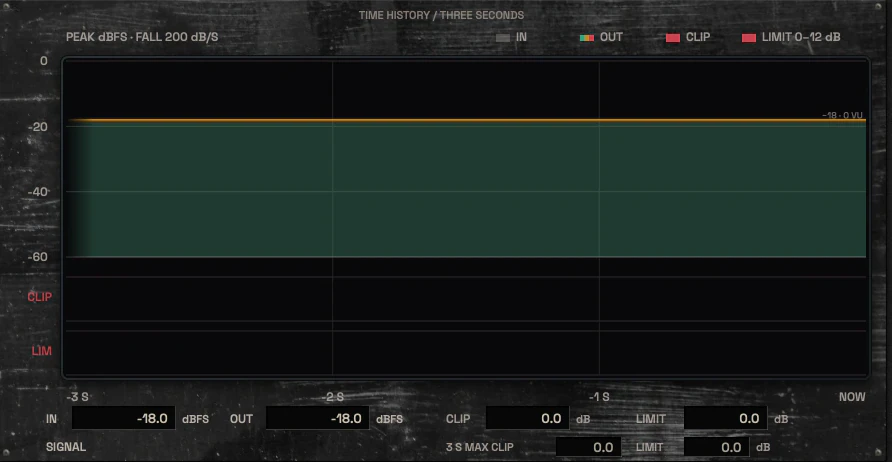
The peak history shows how levels and reduction move over time, which is more useful than a single instantaneous number when you are setting a clipper or limiter on dynamic material. Separate CLIP and LIM reduction readouts let you see which stage is working and how hard.
The history display reflects real signal from the audio path. Do not treat a moving animation as proof of what the DSP is doing.
Peak history shows level and reduction over time.
CLIP and LIM reduction are shown as separate values.
The three-second time history with separate clip and limit lanes and readouts
Three ways to use it
Step-by-step starting points from real heavy sessions. Every mix is different; trust your ears over any recipe.
Snare peak shaving
Insert Entomb on the snare channel and select the Clipper path.
Set Clip threshold so only the loudest hits are shaved, then adjust Knee until the attack still sounds like the source.
Enable the limiter after the clipper and set Ceiling a little below the clipper output peaks.
Use Release so the limiter recovers before the next hit without pumping.
Compare bypassed and active at matched output level before printing.
Drum bus clip before limit
Set the path to Clip to Limit on the drum bus.
Raise Input until the clipper removes the tallest kick and snare overs, watching the CLIP reduction display.
Set Ceiling and Release on the limiter to catch what remains after clipping.
Check that the limiter is not doing most of the work; if it is, revisit the clip threshold.
Print a short section and check for distortion on cymbal and snare tails.
Mix bus safety limiting
Insert Entomb last on the mix bus and start with the Limiter path only.
Set Ceiling to your target sample-peak level and leave the clipper off.
Use Release so gain reduction recovers naturally between sections.
If peaks still arrive too fast for the limiter, enable the clipper before it and shave only the highest overs.
Verify the result with a separate meter and by listening at matched level.
Before you reach for it
The mistakes we see most often with this kind of tool, and where it usually sits in a chain.
Common mistakes
Using the limiter alone on material with very fast transients and then pushing input until it distorts, instead of using the clipper for the first stage.
Treating the sample-peak ceiling as a true-peak guarantee and exporting without a separate true-peak check.
Judging the result without level matching, so a louder clipped signal sounds better than it is.
Where it fits
Entomb usually sits late in a channel or bus chain, after tone shaping and dynamics and before the final meter or print stage. On a snare or kick channel it can follow gating, EQ and saturation. On a drum bus it can follow compression and before any bus tone processing that would change peak levels. On a mix bus it is typically the last processor before export, with a separate meter after it. The exact position depends on whether you want to shape peaks early or catch them at the end.
Factory presets
Control peaks while managing punch, distortion and final output level. The factory library runs to dozens of presets, often more than a hundred, covering technical jobs, genres and instrument categories, sorted by category and searchable. Three of them are below.
Snare Transient Control
Clipper only, with a hard knee. The Clip ceiling sits just under the crack and shaves the first few milliseconds of each hit, and the Clip readout shows how much it takes.
Aggressive Drum Bus Clip to Limit
Clip into Limit. The clipper takes the fastest peaks first, then the limiter catches what is left with a short release. Separate readouts show which stage is working.
Transparent Mix Peak Control
Limiter only, with the 4x detector on and the ceiling set high enough to catch only the occasional peak. Release is slow enough not to pump. The ceiling is sample peak.
Preset families: Clipper Only, Limiter Only, Clip to Limit, Individual Drums, Bass, Buses and Mastering. The ceiling is a sample-peak ceiling.
Why KRIG Audio
Before KRIG we spent years mixing with other makers’ plugins, and we learned what a heavy session needs from a tool. So every plugin starts with the sound: DSP written to a measured target and tested until it behaves the same way every time.
Built from years at the deskWe mixed and mastered with plugins from many makers for years, on our own records and on other people’s, and the same problems kept costing us time: gates that chatter, saturation that smears a riff, limiters that flatten the kick. Each KRIG plugin starts from one of those problems.
DSP written to a measured targetWe write our own signal processing. Before the first line of code we decide what the plugin must do to the signal: the curve it draws, the harmonics it adds, the noise it must not. The DSP is measured against that target, and when the two disagree, the code goes back.
Tested again and againSine tones, sweeps, impulses and noise at the levels people mix at. Every control swept while audio plays, to catch clicks and zipper noise. Every sample rate and buffer size a session can run at. Then real multitracks, at matched level, judged by ear. Every new build runs it all again.
Meters that tell the truthEvery meter and display is fed signals whose values we already know, and has to show exactly that. A VU reads like a VU, gain reduction reads gain reduction, and nothing on the screen moves for show, so what you see is what the plugin is doing to your track.
Presets for every jobDozens of factory presets per plugin, many with more than a hundred: technical fixes, genre starting points and instrument categories, sorted and searchable. A beginner starts from the job in front of them; an engineer gets a tested reference to build on.
Buy once, keep itEvery KRIG plugin is a one-time purchase with a perpetual licence, never a subscription. A 14-day full-feature trial is planned, so you can judge each plugin in your own sessions before you pay.
Not sure it’s the right tool?
How Entomb differs from its closest KRIG neighbours.
Scry · Scry is measurement-only and does not process audio, while Entomb actively clips and limits peaks.
Shackle · Shackle is a stereo compressor for dynamics and punch, while Entomb is a clipper and limiter for peak control.
Sigil · Sigil shapes tone with EQ bands, while Entomb controls level and peaks without tonal EQ.
Where Entomb stands
The DSP is finished and Entomb is in detailed testing. It goes on sale when it has passed measurement, real sessions, the interface check and listening. There are no release dates until a plugin is ready. Follow the roadmap
Research & specificationCompleted
Interface designCompleted
DSP implementationCompleted
Validation & QAIn progress
Release preparationPlanned
ReleasedPlanned
Details
What we can state today. System requirements, tested hosts and test results are published here before release.
Type
Clipper / Limiter
Status
DSP finished, in testing
Platforms
Built for Windows and macOS
Formats (planned)
VST3 for Windows and macOS, AU for macOS. No AAX
Presets
Factory library, see above
Made for
Beginners to mastering engineers
Licence (planned)
Perpetual, one-time purchase. Computers and updates confirmed when the plugins are finished
Trial (planned)
14-day full-feature trial
Entomb questions
Entomb is not a true-peak limiter, a compressor, a gain rider or a metering suite. It does not guarantee a true-peak ceiling, broadcast loudness compliance or zero distortion. It is a clipper and limiter with separate stages and a sample-peak ceiling.
Yes. The default starting points and the separate clipper and limiter stages are intended to make the first move clear: pick a path, set a threshold or ceiling, and watch the reduction displays. The deeper controls are there for engineers who want to balance clipping against limiting.
Entomb is being built for Windows and macOS. It is finished and in detailed testing, not on sale yet.
Scry measures and monitors without changing audio. Entomb processes audio by clipping and limiting peaks. You can use Scry after Entomb to check levels, but they do different jobs.
No. The ceiling is sample peak. The detector is intended to reduce intersample peaks, and oversampling is part of the design, but this is not a true-peak guarantee. Check the final file with a separate true-peak meter if that matters for your delivery.